Most sales enablement video advice stops at “record a quick walkthrough and send it.”
But isn’t recording the easy part? We think what decides whether a video converts is everything you build around it, the call to action, the lead capture, and the data that tells you which videos to make more of.
This guide walks the full loop, from scripting a video to reading the analytics that tell you where a deal stalled. The recording takes ten minutes. The conversion machinery is where the work actually lives.
What Are Sales Enablement Videos?
Sales enablement videos are recorded videos that help your team sell, either by preparing reps to sell better or by doing part of the selling directly with a buyer.
They fall into two groups, and the difference matters more than most teams treat it. Internal videos prepare the seller, covering onboarding, product training, and call reviews.
Buyer-facing videos do the selling, covering prospecting outreach, recorded demos, and follow-ups that keep a deal moving when a live call is not possible.
The reason to keep the two straight is that you measure them differently. An onboarding video succeeds when a rep watches it to the end and ramps faster. A prospecting video succeeds when a buyer books a meeting.
If you judge both by view count, you learn nothing useful about either.
Why Sales Enablement Videos Drive More Conversions
Text strips out everything a buyer uses to decide whether to trust you.
A recorded video carries tone, pacing, and a real face, and a screen recording shows the exact click where your product solves the problem they described. That context is the reason a 2-minute video often outperforms a long email that says the same thing.
Video also removes the scheduling tax. A buyer watches a recorded demo at 11pm on their own time, which means you are not fighting for a calendar slot before you have earned one.
For your side of the deal, a recorded demo scales your best rep across every opportunity instead of trapping that knowledge in one person’s live calls.
The part most teams miss is what happens inside the video. A passive viewer watches and leaves. A video with a booking button, a lead form, or a short question turns watching into a recorded action you can follow up on.
That shift, from views to actions, is where conversion actually comes from, and it is the reason the rest of this guide spends more time on what you add to a video than on how you record it.
Types of Sales Enablement Videos Every Business Should Create
You don’t need every format at once. Start with the two or three that map to where deals currently blocked, then expand.
Here is how the core types earn their place in a sales workflow and who each one serves.
Prospecting Videos That Open Cold Conversations
A prospecting video replaces a cold email’s wall of text with thirty to sixty seconds of you naming the prospect’s problem and showing you understand it. These work best when they feel made for one person, so reference their company, their tab, or their recent post on screen.
Video prospecting is most useful for reps whose cold sequences have stopped getting replies and who need a pattern interrupt that still scales.
Recorded Product Demos You Can Send and Reuse
A recorded product demo lets a buyer see the exact workflow that matters to them without booking a call first. The strongest versions are short and segmented by use case rather than one twenty-minute feature tour, so a buyer can jump to the part they care about.
Product demo videos suit teams selling software or any product with a screen, and they double as the asset you send after a live call so the buyer can re-watch and forward it internally.
Sales Onboarding and Training Videos That Ramp Reps Faster
Sales onboarding videos and sales training videos turn the same explanation you give every new hire into an asset you record once.
A new rep watches the pitch, the objection responses, and the product walkthrough on their own schedule, and you get time back. These serve managers and enablement leads who are tired of repeating the same walkthrough every quarter.
Sales Coaching and Call Review Videos
Sales coaching videos let a manager record feedback over a rep’s actual call recording, pointing at the exact moment a discovery question landed or a deal went sideways. This is far more useful than written notes because the rep sees and hears the moment being discussed.
Call review videos fit any team running structured coaching, and they scale a senior rep’s judgment across a whole floor.
Objection-Handling and FAQ Videos
An objection-handling video answers the question a buyer always asks at the same stage, before they have to ask it. Recording your best answer to “how are you different from X” or “what does implementation actually look like” means every rep sends the same strong response instead of improvising.
These help teams with a predictable set of recurring objections and a long enough sales cycle that the same questions keep surfacing.
Personalized Follow-Up Videos
A personalized follow-up video after a call recaps what you agreed, addresses the one open concern, and keeps momentum during the dead air between meetings.
A short recorded recap is harder to ignore than a follow-up email and gives the champion something concrete to forward to the people who were not on the call. This works for any deal with multiple stakeholders, which is most of them.
How to Create Sales Enablement Videos That Actually Convert
The steps below run the full workflow in Dadan, from script to a shareable link with a conversion layer built in.
The order matters, because the conversion elements in Step 4 are what separate a video that gets watched from one that books a meeting.
Step 1: Script the Video
A rambling video loses the buyer in the first 15 seconds. Open Dadan’s online recorder and write a tight script into the built-in teleprompter, or use the AI script generator to draft one from a short prompt, then trim it to the four beats that matter, hook, relevance, value, and a single ask.
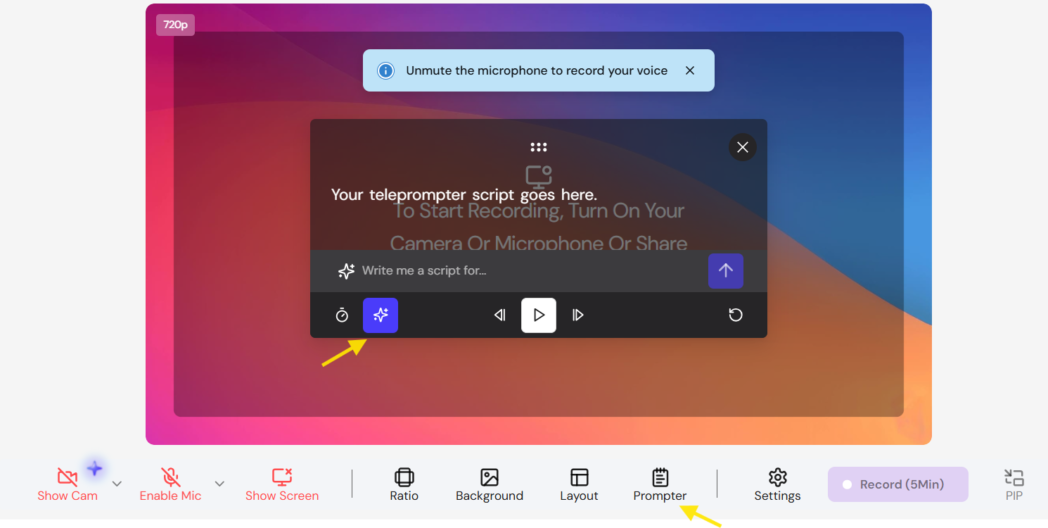
Keep a prospecting script under 60 seconds and a demo segment under 3 minutes.
Step 2: Record Screen, Webcam, or Both
Choose your layout in the recorder. A prospecting video usually leads with your webcam so the buyer sees a person, while a demo leads with the screen and keeps your camera in a small bubble for a human presence.
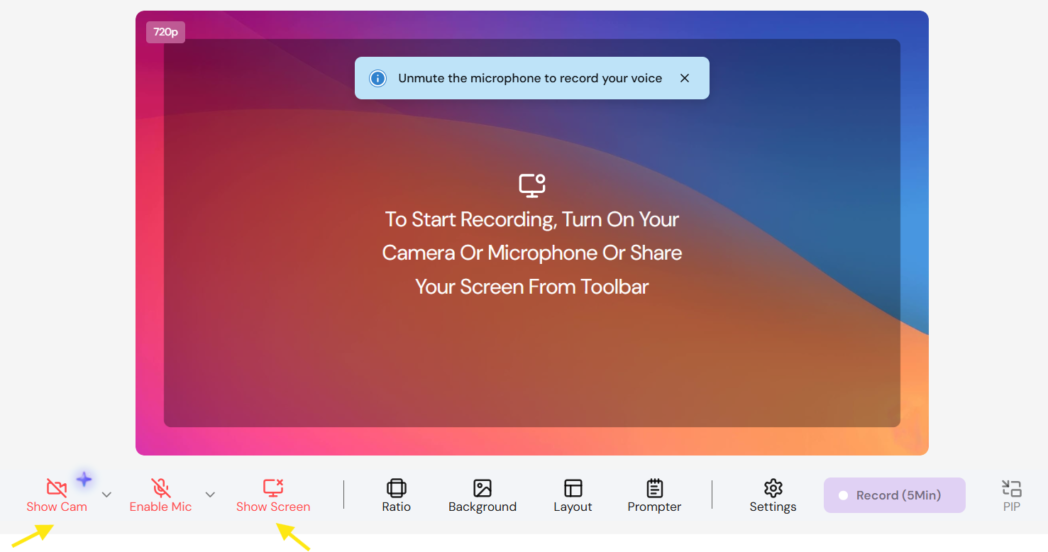
Record screen only, webcam only, or both, and pick the ratio that fits where the video will be watched.
Step 3: Cut With Transcript-Based Editing
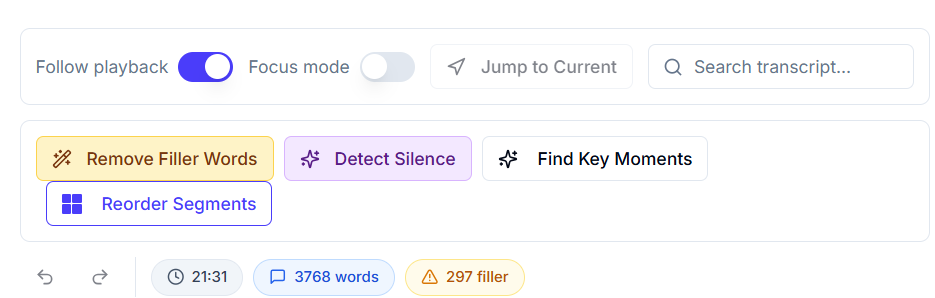
You do not need a video editor to tighten a recording. Open the Transcript Editor, and edit the video by editing its text, deleting a sentence in the transcript removes it from the video.
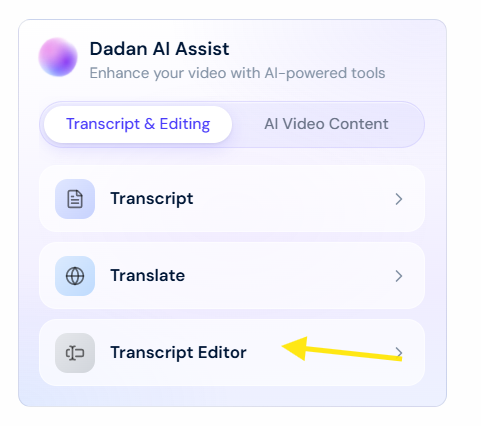
Use the built-in tools to strip filler words and silences in one pass, then pull the strongest 30 seconds into a short clip you can drop into an email.
Step 4: Add the Conversion Layer
This is the step most teams skip, and it is the one that converts. In the video playback screen, open the Video Tools box and click the Call To Action icon.
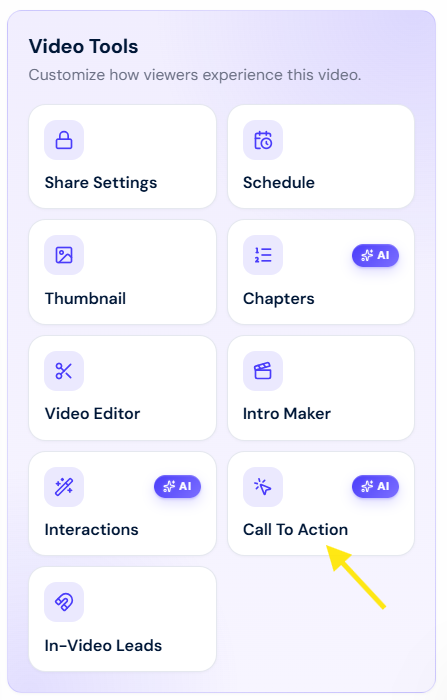
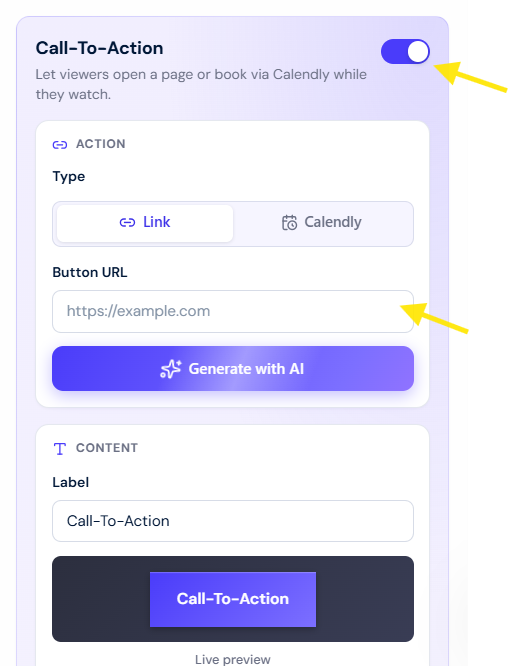
In the Call-To-Action box, enable it, choose the Link type in the Action box, and paste your booking or pricing URL into the Button URL field. For a demo or prospecting video, choose the Calendly option so a buyer books a meeting directly from the video page instead of bouncing to a scheduling email.
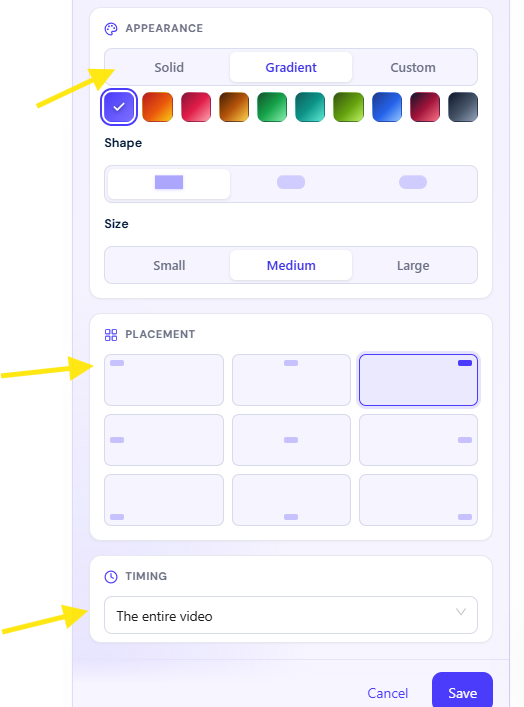
Then decide where the button should appear. In the Timing box, you can show the CTA for the entire video, for a specific window, or only in the last five seconds.
Dadan’s own conversion data points to a useful default here, CTA clicks and captured leads cluster around the middle of a video and again at the very end, so placing your ask at those two points tends to outperform a button that sits on screen the whole time.
Use the Appearance, Content, and Placement boxes to set the color, label, and position, then click Save.
If your goal is capture rather than a booking, add an in-video lead form instead.
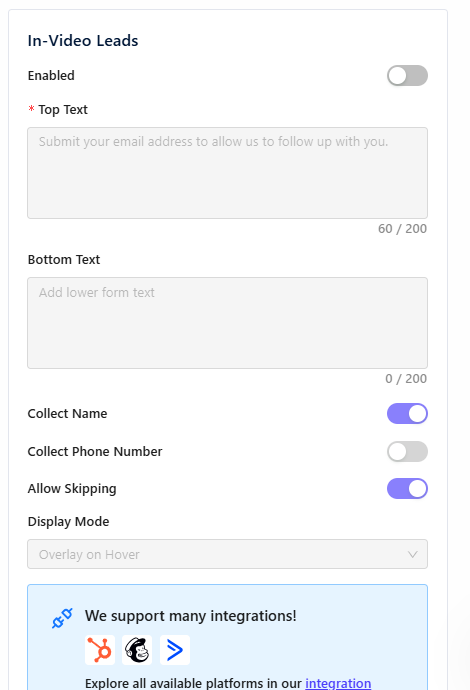
The form collects a name, email, and optionally a phone number while the video plays, and routes the lead straight into your CRM or email tool, with native connections to HubSpot, Mailchimp, ActiveCampaign, Brevo, GetResponse, MailerLite, and GoHighLevel among others.
If you do not connect a tool, the leads are stored inside Dadan so nothing is lost.
Step 5: Lock Down Sharing and Send the Link
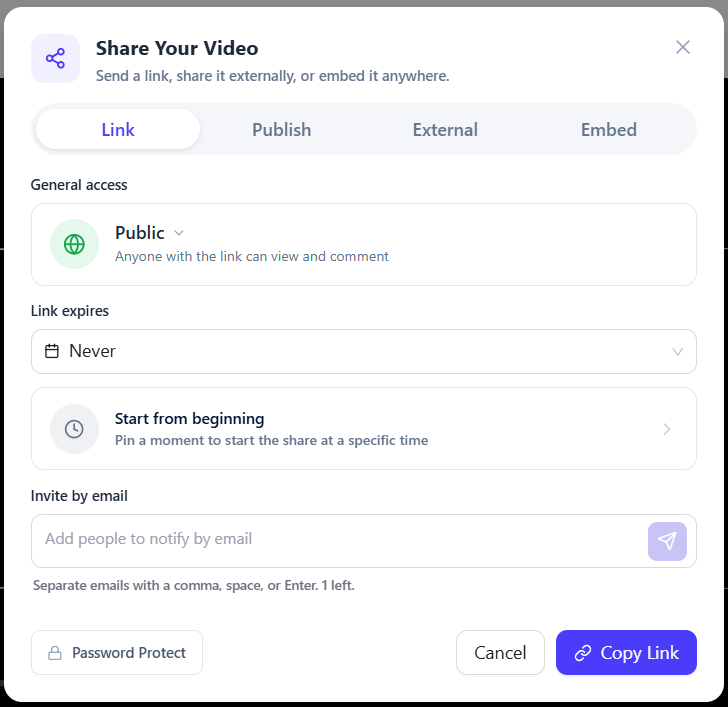
Before you share, set the access that fits the audience. Add a password for a sensitive demo, set an expiry date on a time-limited offer, and adjust the player settings so the page shows what you want.
Then copy the share link and send it, or host the video and embed it where the buyer already is.
How to Measure the Success of Your Sales Enablement Videos
A view count tells you almost nothing about a deal. The metrics that matter for sales sit in the analytics dashboard, and each one maps to a decision you can act on.
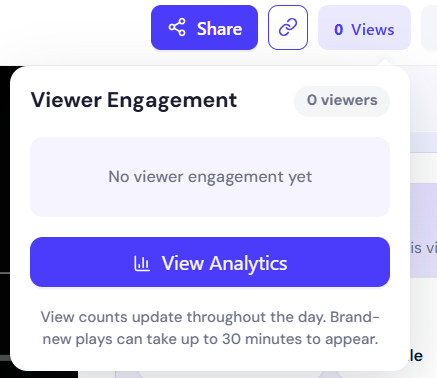
Open the Video Analytics dashboard, click the Views button in the upper right, and choose Views Analytics in the Viewer Engagement dropdown.
Track Audience Retention and Engagement
Start with audience retention. The retention graph shows where viewers keep watching and where they drop, so an early cliff usually means a weak opening and a mid-video slump tells you exactly which section to cut.
Engagement, shown as the average percentage of the video watched, tells you whether a format holds attention across many viewers rather than just one.
Connect Video Performance to Conversions
The conversion performance view breaks CTA clicks and captured leads down by position in the video timeline, so you can see not only how many people acted but where in the video they did it.
The top-performing-videos table ranks your content by views, engagement, and conversion together, which tells you which demo or which prospecting format to make more of.
Traffic sources show whether your videos convert better from email, LinkedIn, or a direct share, so you send the next one through the channel that works.
See Which Prospects Are Actually Engaging
The most underused metric for sales is the per-viewer list on a single video, which shows who watched and how much of it each person finished. A named prospect who watched your demo to the end is a warm signal you can act on the same day.
Why Use Dadan for Sales Enablement Videos?
Most teams stitch a sales video workflow together from a recorder, a separate host, a scheduling link, and a CRM, and the handoffs are where things fall apart.
But Dadan keeps recording, transcript-based editing, hosting, the conversion layer, and the analytics in one place, so the video a rep records on Monday can carry a booking button and start reporting on who watched it without leaving the tool.
For a sales team specifically, three things work really well. A Calendly-powered CTA lets a buyer book straight from the video, which shortens the path from interest to a meeting. In-video lead forms capture and route contacts into your CRM without a separate landing page. And the conversion analytics tie a specific video to specific actions, so you can prove which content drives the pipeline.
None of this means the tools you already know are bad. The difference shows up when you need the interactive layer and the conversion data in the same product rather than bolted on afterward, which is where Dadan is built to win for sales use.
Conclusion
The recording was never the hard part. Sales enablement videos convert when you build the ask into the video, capture the action, and read the data closely enough to know what to fix next.
Pick the one format where your deals stall most, record a first version this week, add a booking CTA before you send it, and let the analytics tell you what to change.
Start for free at dadan.io and record your first one today.
FAQs
What types of sales videos generate the best results?
Recorded demos and short prospecting videos tend to produce the clearest results, because one lets a buyer evaluate on their own time and the other restarts stalled cold outreach. Internally, onboarding and coaching videos pay off by ramping reps faster.
How long should a sales enablement video be?
Keep a cold prospecting video to thirty to sixty seconds, since attention is scarce before you have earned it. Recorded demos can run longer but work better split into short segments by use case rather than one long tour.
How can AI improve sales enablement videos?
AI video for sales speeds up the slow parts, drafting a script from a short prompt, generating a transcript, and stripping filler words and silences so a rough recording becomes a clean one in minutes. It also generates titles, summaries, and chapters that make a video library searchable.
What metrics should I track for sales videos?
Track audience retention to find where viewers drop, engagement to see whether a format holds attention, and conversion performance to connect the video to CTA clicks and captured leads. For individual deals, the per-viewer completion list tells you which named prospect actually watched. Views alone are the least useful number.
Can sales enablement videos shorten the sales cycle?
Yes, because a recorded demo lets a buyer evaluate before booking a call and a booking CTA removes the scheduling back-and-forth. A short follow-up video also keeps momentum between meetings, which is where deals often go cold.
How do personalized videos improve sales conversions?
A video made for one buyer, referencing their company or their specific problem on screen, signals effort and relevance in a way a templated email cannot. That relevance is what earns the reply and the meeting.
Does Dadan help create and track sales enablement videos?
Yes, Dadan handles recording, transcript-based editing, hosting, and the conversion layer of CTAs and lead forms in one place. Its analytics then track retention, engagement, and conversions, including which viewers finished a video.