You record a video that’s only meant for one client, or one team. The problem is what happens after you send it. A normal share link has no protection, so it plays for anyone who ends up with it, and links get forwarded all the time.
For a marketing teaser, that’s still fine. But for a client walkthrough or an internal update, that’s a real problem.
The good news is the fix takes about a minute once you know which controls to use.
TL;DR
To share a business video securely, use a platform that lets you password-protect the link, set an expiry date, and see who watched.
Send the password through a different channel than the link, and never treat an unlisted or “anyone with the link” setting as private. In Dadan, you can apply all three controls from the share panel before you copy the link.
What Is Secure Video Sharing?
Secure video sharing means the link itself decides who has access. A truly private video checks the viewer before it plays, so a forwarded link on its own does nothing.
A password means people have to type in the password before they can watch. An expiry date turns the link off on a date you choose, so an old link doesn’t keep working months later. And you can limit a video to specific people or email domains instead of leaving it open to anyone.
The thing to watch out for is that unlisted and private aren’t the same. An unlisted video is just hidden from search. Anyone with the link can still open it and pass it on. A private video actually checks who you are first.
Most leaks happen because someone set a video to unlisted and assumed that made it private. YouTube doesn’t even let you put a password on a video, so it’s the wrong place for anything sensitive.
How to Share Business Videos Securely With Teams and Clients?
Record or upload your video in Dadan, then set a password and an expiry date on the share link before you send it. The whole thing happens in one tool, so the video never leaves a controlled place.
You do all of this in Dadan without switching apps, and it takes a few minutes. Here’s the full flow.
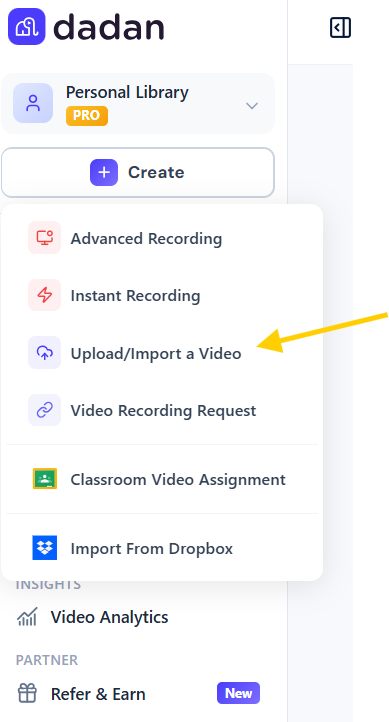
Step 1. Record or upload the video
Use Dadan’s screen recorder, the browser extension, or the desktop app to capture your screen, webcam, or both. Or upload a video you already have.
Step 2. Edit and clean it up
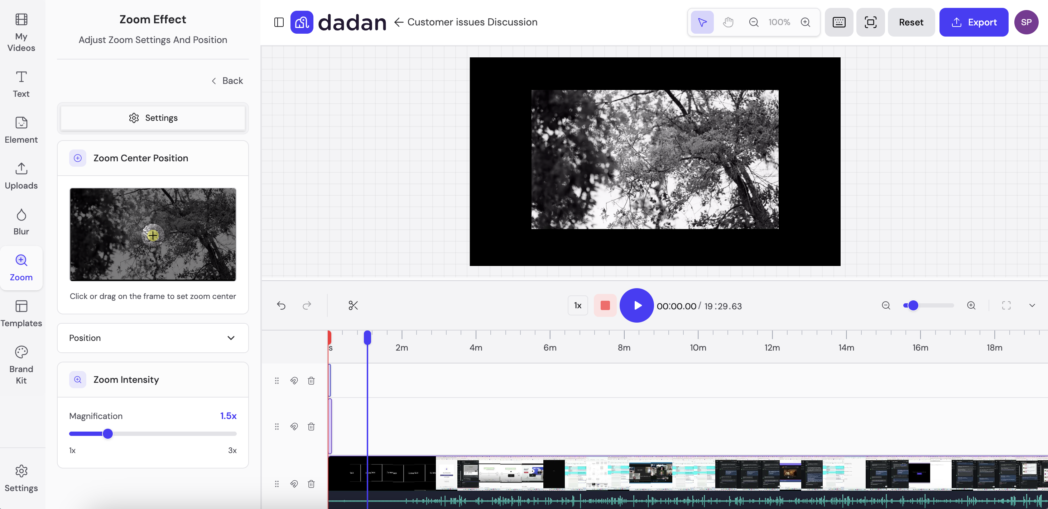
Trim the dead air in the browser editor, and blur anything sensitive on screen, like a customer name or an account number, so it doesn’t go out with the video.
Step 3. Add Password
Open the video and click Share, then click Password Protect. Type the password you want people to enter and click Apply.

With password protection on, a forwarded link is useless to anyone who doesn’t have the password, so the video only opens for the people you actually gave it to.
Step 4. Set an expiry date
In the same panel, open the Link expires dropdown and pick Set Expiry Date for anything tied to a deal or one client. Choose when access should end. Leave it on Never only for videos that should stay up for good.

Step 5. Set who can view and comment
Use Dadan’s per-person permissions so only the right people get access, and so you control who can leave comments.
Step 6. Click Copy Link and send it
Send the password a different way than the link. If one email carries both, anyone who reads it can get in, and the password hasn’t helped you.
After this, the link only opens for people with the password, and it stops working on the date you set.
For a video that should only be available during a set period, Dadan also lets you schedule it.
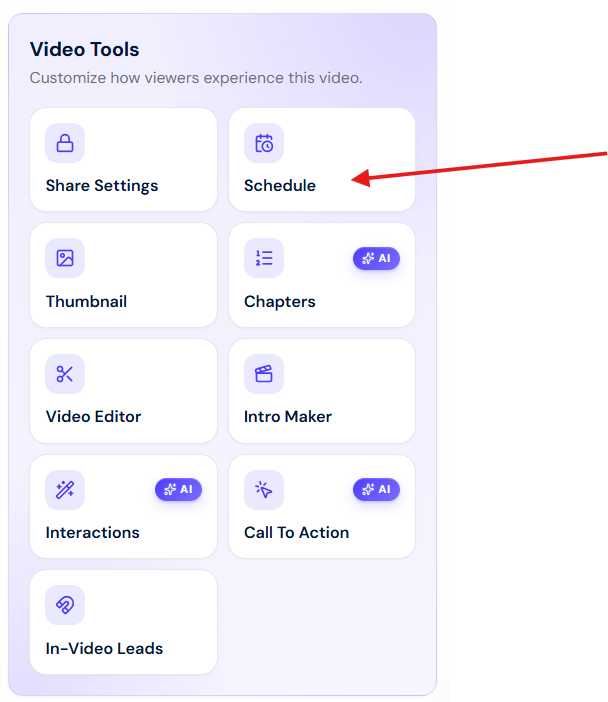
Follow these steps:
- Open the Video Tools section and click the Schedule icon.
- Turn on Enable Schedule.
- Set a Publishing Start Date and a Publishing End Date.
- Click Save Schedule.
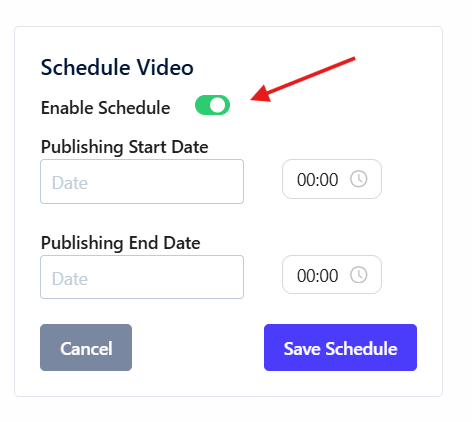
The video publishes when the window opens and comes down when it closes. A trainer can post a recording for one group’s week and have it come down after. A sales team can keep a pricing demo up only while the deal is open.
Secure Video Sharing vs Public Video Platforms
Public platforms are built to be found. YouTube, social video, and open cloud links are made for reach, which is the opposite of what private video needs.
Using a tool built for discovery to hide something means working against it the whole time. That’s a hard way to keep anything sensitive private.
Why Unlisted on YouTube Is Not Private
Unlisted keeps a video out of search and off your channel, and that’s all it does. There’s no password, no expiry, and no record of who watched.
If you put an unlisted link in a shared doc or a Slack channel, it spreads on its own, and the only way to take it back is to delete the video for everyone.
Why Cloud Drives Fall Short for Video
Google Drive can limit a file to specific email addresses, which is private. The problem starts when someone changes it to “anyone with the link” so they don’t have to handle access requests, which happens often.
At that point it’s just a public link. Drive also has no password on playback, no way to see who watched, and playback that depends on the viewer’s account and browser.
A video platform works the other way. The video is closed until you open it, the controls stay with the link, and you can see who watched.
Common Mistakes Businesses Make When Sharing Videos
Most leaks happen because someone treated the link as the protection, reused one password everywhere, or left links working forever.
This isn’t a hypothetical worry.
How to share product videos but restrict viewers
byu/yolonda_swagmore inb2bmarketing
On Reddit, a product marketing manager said their CEO is worried competitors will get hold of their hosted videos, they need the videos to be self-serve through a knowledge base, but they can’t let viewers copy the link or download the file, and they don’t want to manually send an expiring link every time.
Need a secure video hosting solution where videos can only be viewed, but downloading through third party tools is difficult / not possible.
byu/sprucedotterel inVideoEditing
A video producer ran into the same wall sending videos to a real-estate client, wanting a way to serve a video without leaving the raw file URL exposed for anyone to copy and download.
None of these need a new tool. They need you to use the controls already there instead of taking the fastest way to share.
- Treating the link as the protection.
- Using one password for everything.
- Leaving links to work forever.
- Sharing from a personal account instead of a team workspace.
- Sharing with no view tracking.
How AI and Analytics Improve Secure Video Sharing
Access control decides who can open a video. Analytics tells you who actually did. Together they let you confirm a video is private instead of assuming it did.
Track Who Opened the Video
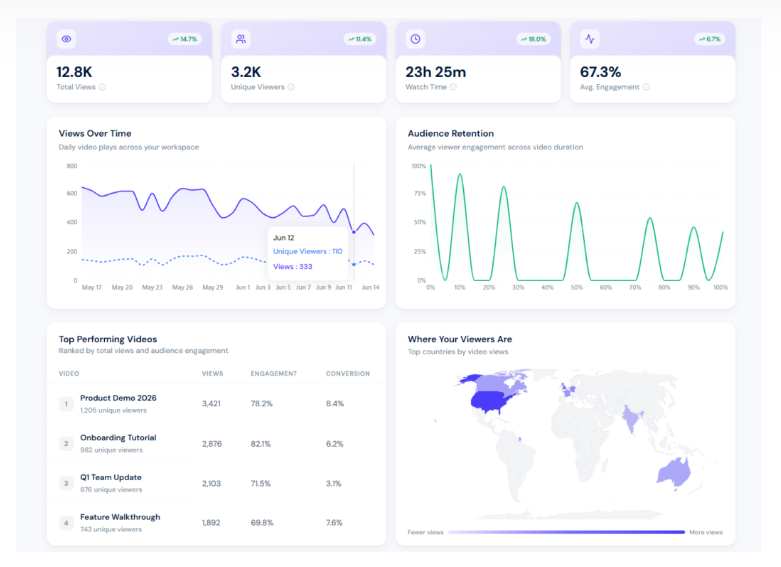
Dadan tracks views and unique viewers, watch time, audience retention, and engagement on every video. For secure sharing, that data is your record.
If a confidential update shows more viewers than you sent it to, you’ll see it in the numbers and can change the password or expire the link before it spreads.
Watch time and retention also tell you whether the right people watched the whole thing or just opened it, which matters for compliance walkthroughs and sign-off training where the watching is the point.
What AI Does, and What It Doesn’t
Dadan’s AI Assist writes your transcripts, titles, descriptions, tags, chapters, and meeting notes, with transcription accuracy stated up to 99 percent. It’s worth being clear about what that does. It makes your library easy to search and reuse, not more locked down.
A searchable transcript helps you find the exact clip for a compliance review, and clear chapters let a reviewer jump to the part that matters.
The part that’s actually about security is the editor. You can blur sensitive details on screen before you share, so a customer name, a dashboard, or an account number in the corner of a recording doesn’t go out with the video.
So the controls that keep video private are blur, passwords, expiry, and access limits. AI is the part that makes a locked-down library easy to work with.
5 Best Secure Video Sharing Platforms for Businesses
The right platform depends on what you’re protecting and who has to manage it. Each one below is rated on the controls that decide how safely you can share, and who it suits.
1. Dadan
Dadan records, edits, hosts, and shares video in one browser tool. You capture your screen, webcam, or both, clean the video up in the browser editor, and share it with a link, without moving the file to a separate host.
Because the file never leaves Dadan, the access controls sit on the video from the start instead of being added after.
That setup is what makes it a strong fit for secure sharing. You can password-protect a link, set an expiry date, schedule when a video goes live and comes down, set permissions per person, and blur sensitive details on screen before you share.
Most of these controls are available without paying for an enterprise plan, which is where several competitors keep theirs.
Best for teams and agencies that share client and internal video regularly.
Key features
- Password-protected share links
- Expiry dates that turn a link off on a set date
- Scheduled publish-and-unpublish windows
- Per-person view and comment permissions
- On-screen blur to hide sensitive details before sharing
- View analytics with unique viewers, watch time, and retention
- Data encryption alongside the privacy controls
Pricing
- Free
- Lite: $8/mo
- Pro: $14/mo
- Business: $14/user/mo
2. Loom
Loom is a screen recording and async video messaging tool built for teams. You record a video in seconds through a browser extension or desktop app, get a shareable link, and send it.
Since Atlassian bought Loom, it has folded into the Atlassian stack, so it sits naturally with product and engineering teams already in Jira and Confluence.
Its security is good at the top of the range. The platform holds SOC 2, ISO 27001, and GDPR compliance, and the Enterprise tier adds the identity controls that larger IT teams ask for. The catch is that the sharing controls that matter most for security only show up on the paid and enterprise tiers.
Best for teams that already use Loom every day.
Key features
- Screen, webcam, or combined recording with an instant share link
- Password protection on Business plans and above
- Public-link expiration on Enterprise and Premium only
- Single sign-on, SCIM provisioning, and admin audit visibility on Enterprise
- Transcription in 50-plus languages on all plans
Pricing
- Starter: Free
- Business: $18/user/mo
- Business AI+: $24/user/mo
- Enterprise: Custom
3. Vidyard
Vidyard is built for sales and marketing video at scale, and it brings serious enterprise security. It pairs screen recording with hosting and analytics, and it ties viewer engagement back to a CRM, which is why sales teams use it to send personalized video and track who watched inside Salesforce or HubSpot.
On security it is one of the stronger options here. It carries a SOC 2 Type 2 attestation, encrypts content in transit and at rest, and offers granular access controls. All of that power comes with a price that is hard to justify if your needs are simple.
Best for teams that need to lock external video to known viewers and tie engagement back to a CRM.
Key features
- Password protection on paid plans
- IP restrictions and domain whitelisting
- Single sign-on and custom permissions on higher tiers
- AES-256 encryption at rest and TLS 1.2 or higher in transit
- SOC 2 Type 2 attestation
Pricing
- Free
- Starter: $59/user/mo
- Teams: Custom
- Enterprise: Custom
4. Wistia
Wistia is a video hosting and marketing platform with deep analytics and a strong setup for embedded content. Teams use it to host videos on their own site, gate them with lead-capture forms, and measure engagement down to the individual viewer.
For privacy, its model is built around access restriction rather than locking the file itself. It holds SOC 2 Type 1 and Type 2 attestations and gives you domain restrictions and password protection. The honest limit is that it protects the page, not the underlying video stream.
Best for teams whose videos live embedded on their own site.
Key features
- Password protection on videos or channels
- Domain restrictions that block playback outside an approved list
- HTTPS delivery
- Per-viewer engagement heatmaps
- SOC 2 Type 1 and Type 2 attestations
Pricing
- Free
- Business: $79/mo
- Enterprise: Custom
5. Vimeo
Beyond hosting, Vimeo gives you fine control over where a video can be embedded, who can see it, and how the player behaves, which is why creators and brands rely on it for client review and private libraries.

The complication is recent pricing. Vimeo restructured its plans in 2026, moved password protection and private links up into the Professional tier and above, and pushed many business accounts onto pricier plans.
Best for teams that want tight control over exactly where a video can be embedded and have room in the budget.
Key features
- Password protection on videos or channels
- Domain restrictions that block playback outside an approved list
- HTTPS delivery
- Per-viewer engagement heatmaps
- SOC 2 Type 1 and Type 2 attestations
Pricing
- Starter: ₹720/mo
- Standard: ₹1500/mo
- Advanced: ₹4500/mo
- Enterprise: Custom
Why Dadan Is Built for Secure Video Sharing
Dadan’s main advantage is how it’s set up, instead of just one feature. Because you record, host, and share in the same browser tool, the controls sit where the video already is, so there’s no export and re-upload step for it to leak through.
That step is where a lot of accidental leaks happen. If you record in one tool, move the file somewhere else to host it, then try to lock it down after, you’ve already made copies you no longer control. Dadan avoids that by keeping creation and access control in one place.
The controls also sit on a plan most teams can reach. Password protection, expiring links, scheduled windows, per-person permissions, and on-screen blur are part of how Dadan shares video, not features held back for a custom enterprise contract, which is where a few competitors keep theirs.
Where Dadan is upfront about its limits is the enterprise governance layer. If single sign-on, SCIM provisioning, or a signed compliance attestation is a hard requirement for you, check Dadan’s current capabilities with the team, because the real case for Dadan is practical secure sharing for teams and clients without enterprise overhead.
For most business videos, that practical control is the part people actually use.
Conclusion
Secure video sharing is closing the gap between sharing quickly and sharing with control. A password people have to enter, a link that expires on its own, and a clear view of who watched will handle most of the real risk.
The tools mostly differ in how much enterprise machinery you take on to get those three things, and for most teams the answer should be not much.
FAQs
How do I share videos securely with clients?
Use a platform that lets you password-protect the link and set an expiry date, then send the password separately from the link. In Dadan you turn on both from the share panel before you copy the link, so the controls go with it.
What is the best secure video sharing platform?
There’s no single best one, it depends on what you need. Use Dadan for password protection and expiry without enterprise pricing. Use Vidyard or Vimeo Enterprise if single sign-on and signed compliance are required. Use Wistia if embed privacy and analytics come first.
Can I password protect business videos?
Yes. Dadan, Loom, Wistia, and Vimeo all let you require a password before a video plays. It only works if you send the password separately from the link, not in the same message.
How do companies share confidential videos?
They limit access to specific people, domains, or time windows, usually with a password, an expiry date, and view tracking together. Larger companies add single sign-on and domain restrictions so only authenticated employees on approved networks can watch.
Is Google Drive secure for video sharing?
It can be when you limit a file to specific email addresses, but it stops being private the moment someone changes it to “anyone with the link.” It also has no password on playback and no view tracking, so a dedicated video platform gives you more control over confidential content.
How can I track who watched my videos?
Use a platform with viewer analytics. Dadan shows views, unique viewers, watch time, audience retention, and engagement per video, so you can confirm a video reached only the people you meant and catch unexpected viewers early.
What is private video hosting?
Private video hosting stores and serves video with access closed by default, so it only plays for viewers who meet conditions you set, like a password, an approved domain, or being on your team. Public hosting does the opposite and tries to make content easy to find.
Can secure video sharing improve collaboration?
Yes. When the access controls hold, teams share sensitive material more freely because they trust it stays contained, and viewers can comment and reply without it leaking out. The hesitation that slows down async feedback mostly goes away.
What features should a secure video sharing platform have?
At a minimum, password-protected links, expiring links, access limits by person or domain, and viewer analytics. If your needs are stricter, also look for single sign-on, encryption in transit and at rest, and a recognized compliance attestation like SOC 2.