What’s the Fastest Way to Create an Explainer Video Online?
Most explainer videos fail for the same reason. They try to say everything about the product instead of one clear thing about the problem it solves.
The companies that get this right, Dropbox, Slack, Mailchimp, all built their early explainer videos around a single idea, instead of a feature list.
This guide walks through what an explainer video actually is, the formats worth choosing between, and a real step-by-step process for making one.
TL;DR
- An explainer video is a short video, usually 60 to 90 seconds, that makes one product idea easy to understand fast.
- The formats that work are animated, whiteboard, live-action, screencast, character-led, and now AI avatar-led.
- The process that works every time is script first, then record or animate, then edit around the transcript, then add a single clear CTA.
AI has mostly changed the scripting and production speed, but not the core structure. Tools split into two camps, animation-first platforms and record-first platforms like Dadan that work best if you’re filming your own screen or face rather than building characters from scratch.
What Is an Explainer Video?
If someone can’t explain what your product does in one sentence, an explainer video is the fastest way to fix that without rewriting your whole homepage.
An explainer video is a short video built to make one idea about your product or service clear and memorable, fast. It’s not a full product demo, and it’s not a brand film.
The format runs from simple to elaborate. Some explainer videos are 2D animation with a voiceover. Others are someone talking to a camera, or a screen recording with a script laid over it.
What makes an explainer video actually work for complex B2B or tech topics?
byu/Salamandra_UK incontent_marketing
What makes a video an explainer rather than just a video is the intent behind it. To answer the question a visitor is already asking, which is usually “what does this actually do, and is it for me.”
Most run between 60 and 120 seconds. That’s roughly how long you have before a visitor decides to keep watching or bounce.
Why Explainer Videos Are Important for Businesses
If your landing page bounce rate is high and support keeps answering the same “how does this work” question, that’s usually a sign the page needs a video, instead of more copy.
Text asks the reader to build a mental model of your product from scratch. But video hands them one. That difference matters most when the product itself is abstract, which is most of SaaS, most of fintech, and a lot of consumer apps that don’t have a physical form to point at.
Dropbox is the textbook case here.
Before Dropbox existed, “files that sync automatically across every device” wasn’t a concept most people had a mental model for.
Their early explainer video used simple cut-out animation to show the idea in under two and a half minutes. It sat on the Dropbox homepage for years and is still cited as one of the clearest examples of what a good explainer video is supposed to do.
The business case is not just polish but. A video reduces the number of times your support team has to answer the same questions by hand.
And it gives a visitor who isn’t ready to talk to sales a way to self-serve their way to understanding, which is where most buyers want to be before they’ll agree to a call.
Types of Explainer Videos
If you’re trying to decide between whiteboard, animated, or live-action for your product, the honest answer is that it depends on how visual your product actually is and how much time you have.
The format you pick should match your product, your budget, and how fast you need to do it.
Animated (2D) Explainer Videos
The most common format for SaaS. Illustrated characters and scenes walk through a problem and a solution, the way Slack’s early videos did with scattered inboxes turning into organized channels.
Animation is flexible because it can represent abstract ideas, like data moving between systems, that would be awkward to show on camera. It’s also the most labor-intensive format to produce well.
Whiteboard Explainer Videos
A hand appears to draw the story as a voiceover narrates it. It reads as approachable and low-pressure, which is why it shows up a lot in education and nonprofit explainer videos.
Dropbox’s original video is closer to this style than pure character animation, cut-out figures on a flat background, drawn simply on purpose.
The format most people picture when they hear a whiteboard explainer is RSA Animate, whose illustrated lecture recaps popularized the style well beyond marketing.
Live-Action Explainer Videos
Real people, no animation. This works well when the product has a physical or human element worth showing, or when your brand voice depends on an actual face rather than an illustrated one.
Dollar Shave Club’s launch video is the most cited example of a live-action explainer done with humor instead of a big budget.
Screencast and Product Demo Videos
A recording of the actual software interface, usually narrated over the top, sometimes with a face in the corner. This is the fastest format to produce because there’s no animation or illustration involved at all, and it’s the most honest, since the viewer is watching the real product instead of a stylized version of it.
It’s also the format most screen-recording tools, Dadan included, are built around.
Character or Mascot-Led Videos
A recurring animated character carries the story across multiple videos, which builds recognition over time the way a real spokesperson would.
Duolingo’s owl is the most recognizable example of a mascot doing marketing work well beyond a single explainer video.
AI Avatar Explainer Videos
The newest category. A digital presenter, either a stock avatar or a cloned version of a real person, delivers the script to the camera without anyone actually filming.
How to Create Explainer Videos Step by Step
If you’re staring at a blank timeline wondering where to actually start, the order that works is script, then record, then edit around the transcript, then add one CTA.
People debate this constantly online, whether it’s worth learning to DIY an explainer video or just hiring it out from day one.
The honest answer is that the process below works whether you’re doing it yourself this afternoon or handing the steps to a freelancer as a brief.
Step 1: Nail Down the One Thing Your Video Needs to Say
Before any recording happens, decide what single idea the viewer needs to walk away with.
One single idea. If you can’t finish the sentence “after watching this, they’ll understand that our product ___,” you’re not ready to write the script yet.
Step 2: Write the Script Before You Touch a Camera
A 90-second video needs roughly 150 to 200 words of spoken script. Open with the problem. Spend the middle showing the solution in action rather than listing features. Close with one specific action.
If you’re using Dadan, the built-in AI script generator and on-screen teleprompter mean you can draft the script and read it back directly in the recorder, instead of switching between a doc and a camera.
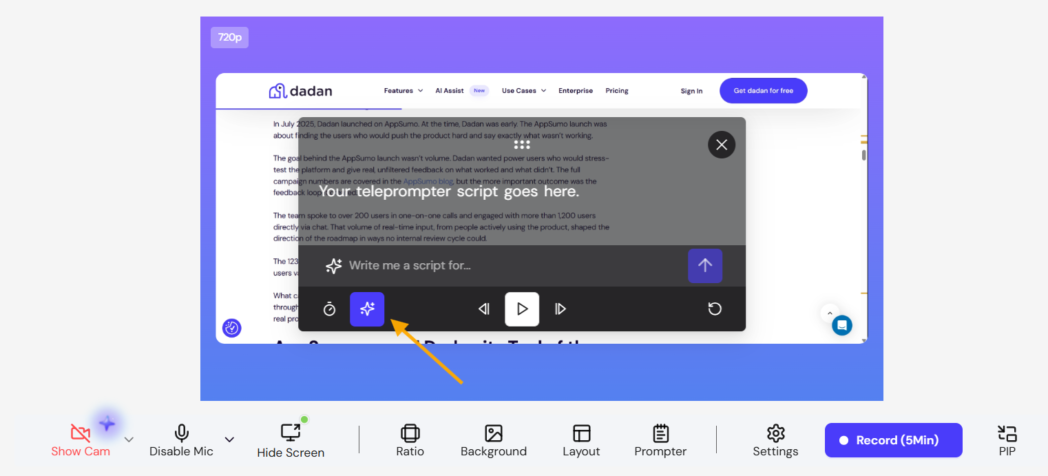
This is also where the AI script generator earns its keep, since it can turn a rough prompt or document into a first-pass script you edit down rather than write from scratch.
Ready to create your explainer video? Sign up for Dadan and start building your first video.
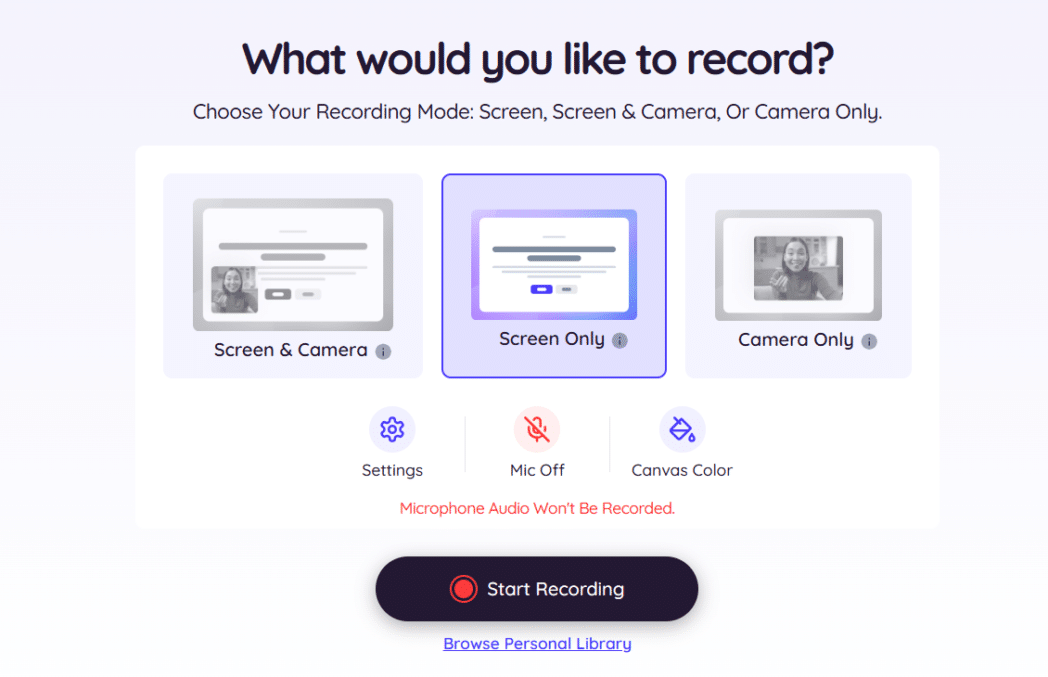
Step 3: Record Your Screen, Your Face, or Both
If you’re making a screencast or live-action style video, this is where the actual capture happens. Record your screen, your webcam, or both together, depending on whether the video is a product walkthrough or a presenter-led explainer.
Step 4: Edit by Editing the Transcript
This is the step that used to eat the most time. Scrubbing a timeline frame by frame to cut a stumble or a long pause is slow even for people who do it daily.
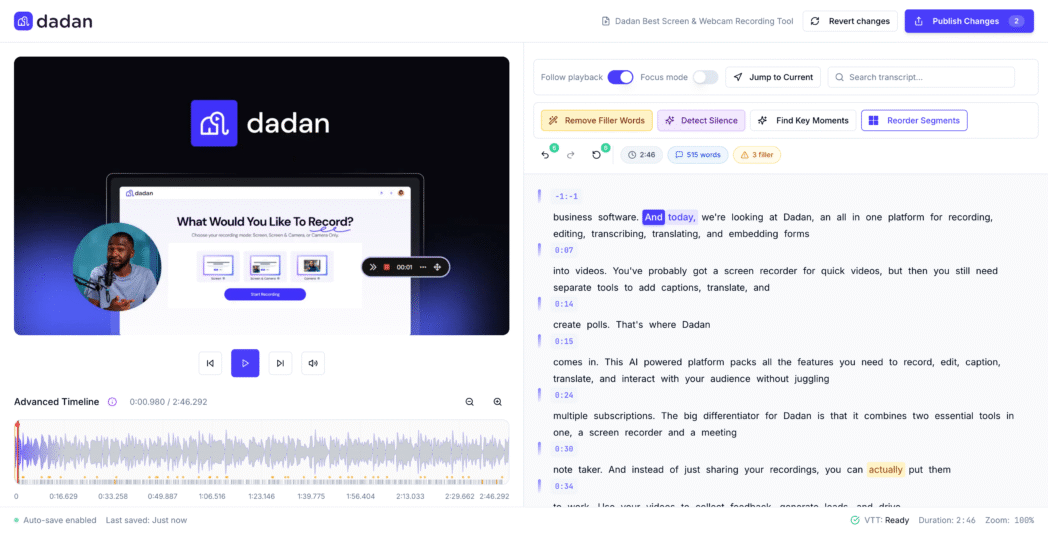
Transcript-based editing flips that. You see your video as text, delete the sentence you fumbled, and the video cuts itself to match.
Step 5: Add Visuals, Captions, and a Clear CTA
Once the core video is cut, layer in what makes it easy to follow without sound. Captions matter more than most teams assume, since a large share of video gets watched muted on social feeds and inside busy offices.
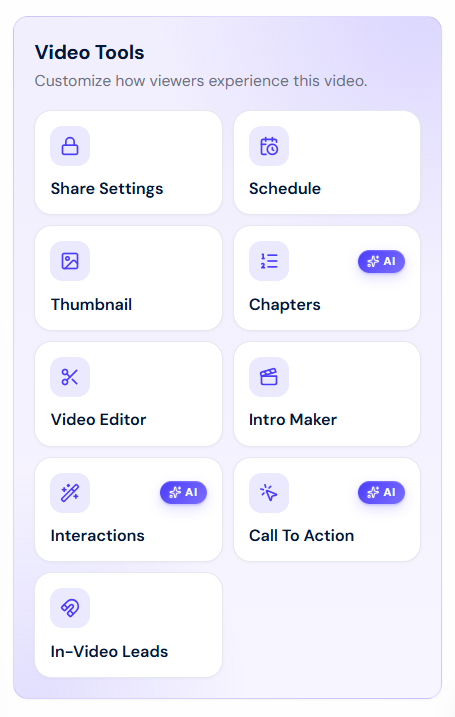
This is also where you decide on the single action you want the viewer to take, and where a tool with built-in CTAs and lead forms saves you from bolting on a separate landing page just to capture interest.
Step 6: Publish, Share, and Track What Happens Next
Export or host the finished video, drop it wherever your audience already is, your homepage, a sales email, a product page, and check what happens after someone watches it.
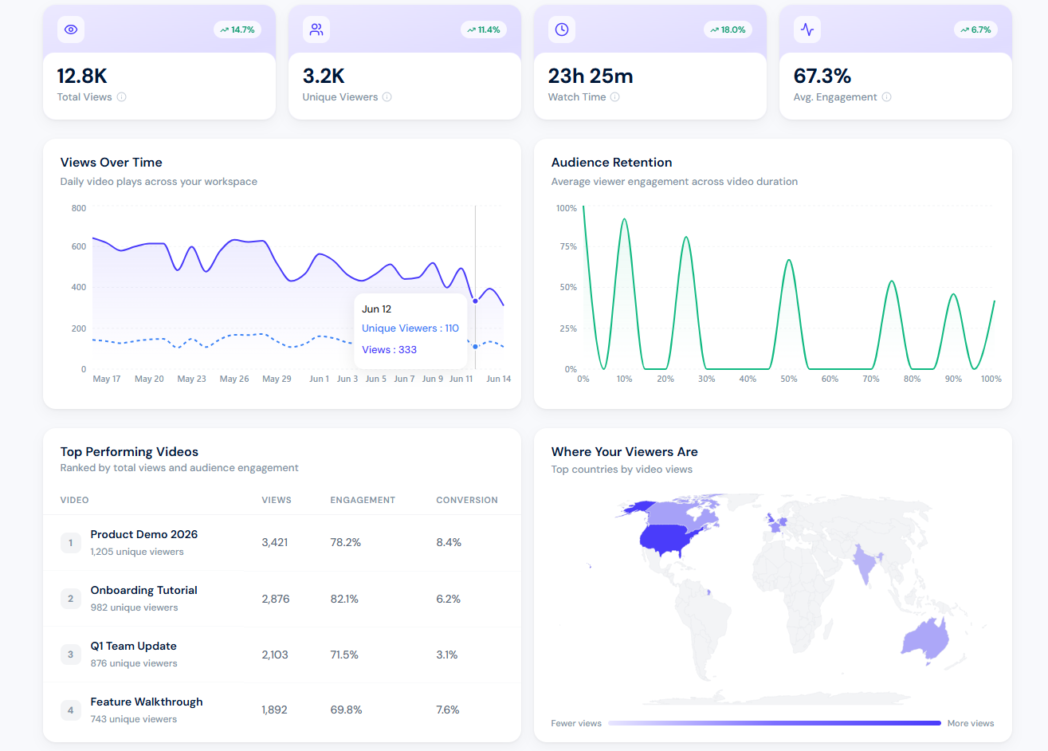
Watch-through rate tells you if the video holds attention. Click-through on your CTA tells you if it actually moves people.
Explainer Video Examples
If you want to see what “problem first, product second” looks like in practice before you write your own script, these are the ones worth watching.
A few explainer videos get cited over and over because they solved the same problem every SaaS company faces, making an abstract idea feel obvious in under two minutes.
Dropbox’s original explainer is the one referenced most often in this format’s history. It used plain cut-out animation and a familiar “your files, everywhere” framing to explain cloud sync before most people had a mental model for what that meant.
Slack’s early animated explainers followed a similar structure from a different angle, opening on a chaotic inbox and email thread before showing the same team calm and organized inside Slack.
The trick is that the video shows the “before” state the viewer already recognizes before it shows the product at all.
What ties these together is that each one leads with a problem the viewer already feels, shows the solution doing the work visually instead of describing it, and stays short enough that nobody has to commit to watching a full pitch.
How AI Is Transforming Explainer Video Creation
If you’re wondering whether AI has actually changed anything here or if it’s just marketing noise, it has, mostly in scripting and production speed rather than storytelling itself.
The biggest shift is that AI has removed most of the production bottleneck that used to make explainer videos expensive and slow.
Script Generation
Script generation is the clearest example. Tools across the category all let you start from a rough idea, a document, or even a URL and get a workable first draft instead of a blank page.
None of these replace a human editing pass, but they remove the part of the process that used to stall projects for weeks.
AI Avatars
AI avatars are the second big shift, and they split the category into two camps. Platforms like Synthesia let you generate a presenter, sometimes a stock avatar, sometimes a cloned version of a real person, and have them deliver a script without anyone stepping in front of a camera.
The other camp, record-first tools like Dadan, takes a different approach to the same underlying problem. Instead of generating a presenter, AI handles what happens after you record, transcribing the video, suggesting titles and chapters, cutting silences and filler words from the transcript, and translating subtitles into more than 120 languages.
Neither approach is objectively better. If you want a video without ever recording yourself, an avatar tool is the right call.
If your product benefits from being shown live on screen or from your own voice building trust, a record-first tool with AI-assisted editing gets you there faster than editing raw footage by hand ever did.
Captions and Translations
Captioning and translation are the smaller change, but arguably the most useful for reach. What used to require a localization vendor now happens automatically inside most of these platforms, which is a real factor if your explainer video needs to work for an audience outside your home market.
Why Dadan Is Ideal for Creating Explainer Videos
If your explainer video is going to be live-action, screen-recorded, or presenter-led rather than fully animated, Dadan covers the entire production chain in one browser tab instead of four separate subscriptions.
Most of the process above, script, record, edit, add a CTA, publish, track, is normally spread across a script tool, a recorder, an editor, a hosting platform, and an analytics dashboard.
Dadan was built to cover that whole sequence for anyone making a live-action, screencast, or webcam-led explainer video rather than a fully animated one.
The script generator and on-screen teleprompter mean you can write and read your explainer script without leaving the recorder.
Recording itself happens in the browser or the desktop app, screen, webcam, or both together, up to 4K on paid plans, with a custom camera bubble and on-screen annotations if you’re walking through a product live.
The transcript editor is where the real time savings show up. Instead of scrubbing a timeline to cut a stumble, you edit the video as text, and AI Assist handles the transcription, the auto-generated titles and descriptions, chapter breaks, and summaries in the background.
Where Dadan pulls ahead of a pure recording or editing tool is what happens after the video is cut.
You can drop a quiz, poll, or open-ended question directly into the timeline, add a lead-capture form at the point of peak interest, or place a CTA button that sends the viewer straight to a trial or a booking page, all without leaving the tool or exporting to a landing page builder.
Hosting comes with password protection, expiry dates, and analytics that show watch time and engagement rather than just a view count. Subtitles translate into 120-plus languages if the explainer needs to reach outside your home market.
Conclusion
The format you choose matters less than most teams assume. What actually moves the needle is saying one clear thing, showing rather than describing it, and giving the viewer a single obvious next step.
Whether that means briefing an animation studio, generating a script with AI, or just opening a recorder and talking through your product, the process is the same six steps.
Start with the free plan at dadan.io and see how far a script, a recording, and a transcript-based edit get you before your next production deadline.
FAQs
How long should an explainer video be?
Most effective explainer videos run 60 to 90 seconds, with some stretching to two minutes for more complex products.
What makes a good explainer video?
A clear single message, a problem-first opening rather than a feature list, visuals that show the solution instead of describing it, and one specific call to action at the end.
How do you write an explainer video script?
Start with the problem the viewer already recognizes. Aim for around 150 to 200 words for a 90-second video, written in plain spoken language rather than marketing copy. End with one specific action rather than several options.
What is the best software for creating explainer videos?
It depends on the format. Dadan is built for live-action, screen-recorded, and webcam-led explainers, covering scripting, recording, editing, and hosting in one place, with a free plan and paid plans from $8 a month billed annually.
Can I create explainer videos without design skills?
Yes. AI script generators remove the blank-page problem, transcript-based editing replaces manual timeline scrubbing, and screen or webcam recording needs no animation or illustration skill at all.
Are explainer videos effective for SaaS products?
Yes, particularly because SaaS products are often abstract enough that a viewer can’t picture what they do from a homepage alone.
How do explainer videos increase conversions?
They reduce the effort it takes to understand what you’re offering, which lowers the barrier between landing on a page and taking action. Placing a CTA or a lead-capture form at the point in the video where interest peaks, rather than making the viewer hunt for a separate signup form, closes that gap even further.
Should explainer videos include a CTA?
Yes, and it should be one specific action.
How much does it cost to create an explainer video?
It ranges widely by format. A fully animated video from an agency can run into the thousands. Dedicated animation software runs from roughly $58 to $200-plus a month depending on the platform and tier. A self-produced live-action or screen-recorded explainer using a tool like Dadan can be made on a free plan, or for $8 to $24 a month on paid tiers.