Someone on r/ProductivityApps asked the question most teams hit once their video library gets big enough.
Their post was titled “Has anyone tried a knowledge base where you can search inside videos?”
Has anyone tried a knowledge base where you can search inside videos?
byu/SignPsychological728 inProductivityApps
The post describes precisely about the failure we’re discussing. Once you have dozens of videos, finding one specific answer means scrubbing through everything. They wanted three things, which were videos searchable by question, results that jump to the exact moment something is explained, and a library that behaves like a knowledge base rather than storage.
Then they asked whether that works in practice or whether text still wins for searchability.
It works. But it just does not happen on its own, and the step that makes it work is the step most teams skip.
TL;DR
- A video knowledge base is a searchable, organized library of short task-focused recordings that answer recurring questions on demand.
- Building one takes four things, which are a structure people can predict, transcripts on every video, a tagging system with rules, and a review cycle.
- In Dadan, that means Team Spaces and folders for structure, AI transcripts and tags for search, chapters for navigation, and playlists for sequenced learning paths.
What Is a Video Knowledge Base?
A video knowledge base is a centrally hosted, searchable library of short recordings that answer recurring questions, replacing the need to explain the same process repeatedly.
Each individual recording in it is a knowledge base video, which is a short, focused clip built around one task. These are essentially recordings designed to be short, task-oriented, and easy to replay, showing a process visually rather than describing it in text.
That definition rules out a lot of what teams pile into shared drives. A 47-minute all-hands recording is an archive or a 90-second walkthrough of how to submit an expense report is a knowledge base video.
The distinction that actually matters is retrieval. A video library stores things but a video knowledge base returns the right thing when someone asks for it, which means the search has to reach inside the video.
Knowledge base videos are different from other video content because:
- Training videos teach a whole subject over a long runtime, while knowledge base videos answer one question in under three minutes.
- Marketing videos persuade someone who has not decided yet, while knowledge base videos serve someone who has already committed and is now stuck.
- Meeting recordings capture whatever happened, while knowledge base videos are recorded deliberately with a specific question in mind.
- Documentation explains what to do, while a knowledge base video shows the actual screen where you do it.
Why Every Business Needs a Video Knowledge Base
Video knowledge bases eliminate the repeat-explanation tax, which is the time senior people spend answering the same question for different people across months.
The cost of not having one is invisible because it never appears as a line item. It shows up as your best operations person spending four hours a week on questions she has already answered, or as a new hire waiting two days for a Slack reply before she can finish an onboarding task.
This is not a new complaint and it is not confined to video.
On Hacker News, one commenter described their employer’s internal wiki in terms most people will recognize, calling it awful, saying search does not work, and describing it as having no structure at all.
Their conclusion was that general knowledge bases handle strategy documents well but fall down on straightforward how-to guides, which is precisely the gap video fills.
Read the thread: Hacker News discussion on internal wikis and SOPs
The same question has been asked directly by documentation teams. Cisco’s community forum ran a thread asking whether video or audio would be useful for documentation topics, and it drew 16 replies.
One Hall of Fame contributor argued video was most valuable for hardware, because seeing a module inserted into a chassis communicates something a diagram cannot.
Read the thread: Cisco Community on video for documentation topics
That reply contains the actual decision rule. Video wins where the thing is spatial, visual, or changes faster than a screenshot gets updated. Text wins where people need to scan rather than follow.
What Changes When the Library Becomes Searchable
- New hires self-serve instead of queuing behind a single subject-matter expert.
- Institutional knowledge survives resignations, because the person’s explanation stays even after the person leaves.
- Support teams answer with a timestamped link instead of retyping a walkthrough.
- Distributed teams stop losing a day per question to timezone gaps.
- Processes get documented at the moment they are performed, rather than during a documentation sprint that never happens.
Where Video Knowledge Bases Fail
Being honest about this is important because the failure mode is common and predictable.
Video knowledge bases fail when they become write-only. People record enthusiastically for six weeks, nobody builds the retrieval layer, and within a quarter the library is 200 untitled recordings that are functionally invisible.
Searching a video knowledge base is harder than searching text unless you deliberately build the searchable layer, and that layer is transcripts, tags, and chapters.
Recording is the easy part and it is not the part that determines whether this works.
Key Components of an Effective Video Knowledge Base
A few components determine whether a video knowledge base gets used, which are predictable structure, generated transcripts, a controlled tag vocabulary, and an owned review cycle.
Most guides on this topic stop at “organize your videos into folders,” which is where the problem starts rather than where it ends. Folders help the person who created them and almost nobody else.
The components below are ordered by how much they affect whether a stranger to the library can find something.
A Structure Somebody Can Predict Without Being Told
Your folder hierarchy should map to how people ask questions, not to how your org chart is drawn. Someone looking for the refund process thinks “refunds” not “Customer Operations, Tier 2, Policies.” Name folders after the questions people have.
Transcripts on Every Video
This is the component that turns a library into a knowledge base, and in Dadan it also gates everything else.
Dadan’s AI Assist features rely on the video AI transcript, so you have to generate the transcript first before titles, tags, chapters, or summaries become available. Skipping this step means the rest of the system does not exist.
A Tag Vocabulary With Rules
Dadan caps tags at 8 per video, which is a useful constraint rather than a limitation. It forces you to decide what a video is actually about.
Agree on a fixed list before anyone starts tagging, because a library where one person tags “onboarding” and another tags “new-hire” and a third tags “New Hire Setup” is a library with three broken indexes instead of one working one.
Chapters on Anything Over Three Minutes
Chapters are what let someone land on the exact 40 seconds they need instead of scrubbing a timeline. They also feed search, so a chapter titled “Approving a refund over $500” becomes a findable entry point on its own.
A Named Owner and a Review Date
Every video needs a person responsible for it and a date when someone checks whether it is still true.
Without this, your knowledge base slowly fills with confidently wrong instructions, which is worse than having no knowledge base, because people trust it and act on it.
How to Build a Video Knowledge Base for Your Business
Building a video knowledge base in Dadan takes five steps, which are setting up shared spaces, planning your first recordings, making each video searchable, sequencing related videos into playlists, and connecting the library to an AI assistant.
The steps below use Dadan’s live interface. Do the structure before you record anything, because retrofitting an organization onto 80 existing videos is significantly worse than spending 20 minutes on it upfront.
Step 1: Set Up Your Team Space
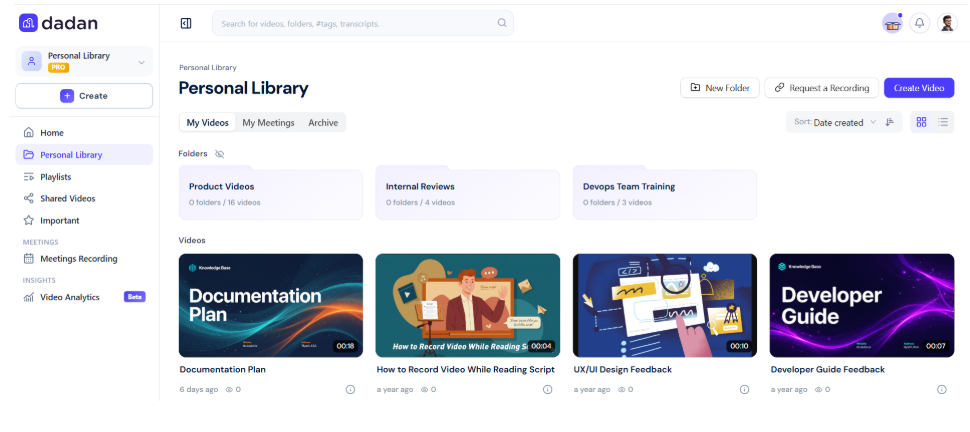
Dadan gives you two separate places to keep videos. Your Personal Library is for individual use, where you store, edit, and share your own recordings.
A Team space is shared, where several members record, comment on, and manage content together. A knowledge base belongs in a Team space, because anything you build in a Personal Library disappears from your team’s reach the day you go on leave.
Create the Team Space
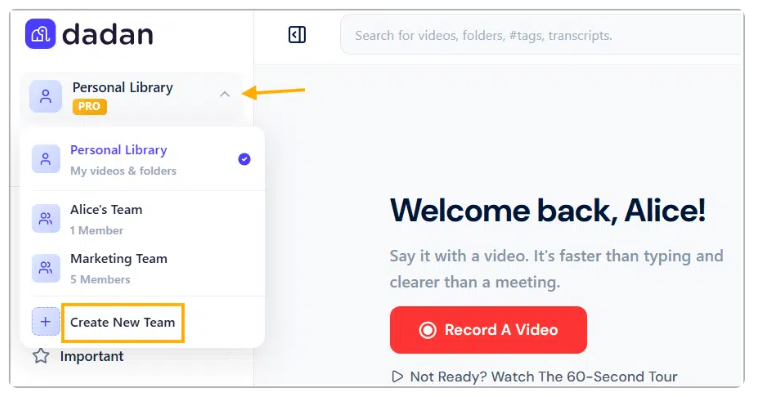
- Go to the Dadan web app. In the left bar, click the arrow next to Personal Library, then click Create New Team from the drop-down menu.
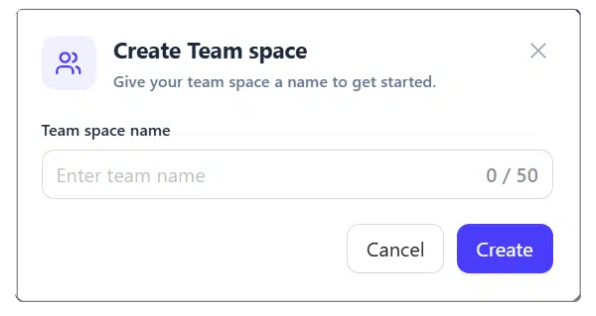
- In the Create Team space box, enter a name for the team that reflects its purpose. Name it after the audience or the subject rather than the department. Click Create.
Invite Your Team and Set Access Levels
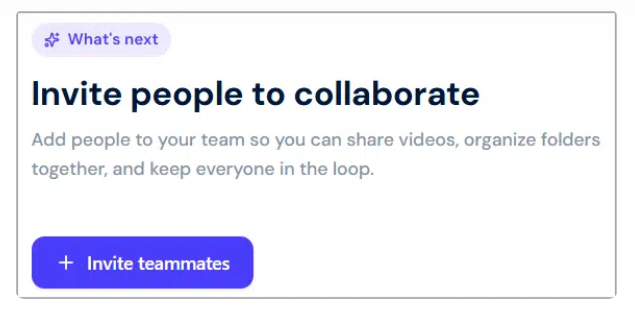
- To invite members, click the Invite people to collaborate button. You can also click the Manage Members button below the team’s settings in the right sidebar.
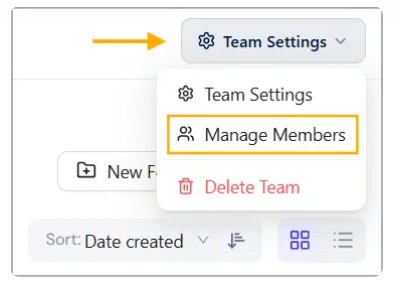
- The Manage team space members box opens. In the email field, enter the email address of the member you want to invite.
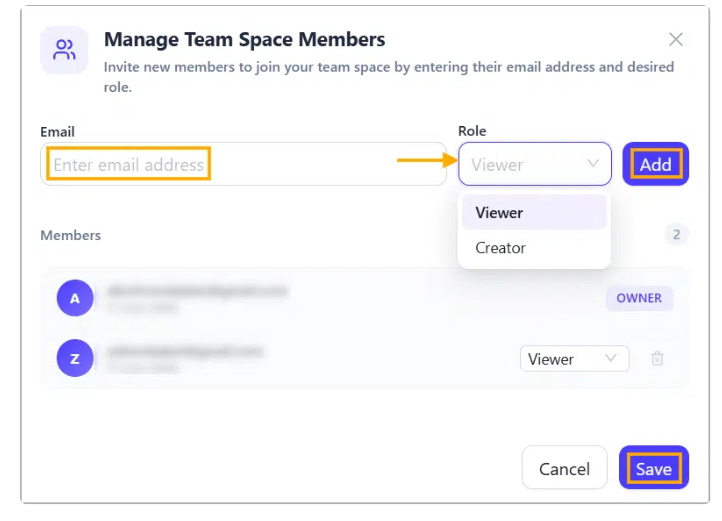
- Assign that member a role to control their level of access. A Viewer can only watch and comment on shared videos. A Creator can record, edit, comment, and share videos.
- Click Add for each member to add them to the team list.
- Click Save to send the invitations.
For a knowledge base, default everyone to Viewer and hand Creator to the smaller group who will actually maintain content. Anyone who repeatedly answers the same question is a good candidate for Creator, regardless of seniority, because they are the person who knows the answer.
Each invited member receives an email and an in-app notification containing links to join your team and confirm their membership.
If someone never accepts, you can resend or cancel the invitation from the team members list.
Step 2: Build Your Folder Structure
Folders live inside the Team space and are what your team browses when search does not give them the answer. Create them before you record anything.
Repeat for each top-level category. Four to six folders named after the questions people ask beats twenty named after your org chart, because someone hunting for the refund process thinks “refunds,” not “Customer Operations.
Step 3: Plan and Record Your First 10 Videos
Do not start with your most complicated process. Start with your most frequently asked question.
- Pull the last month of your team’s support channel or shared inbox and list every question that appeared more than twice. That list is your recording queue, in priority order.
- Write a one-line scope for each video before recording. If the scope needs an “and” split it into two videos.
- Record from the web app, the Chrome or Edge extension, or the Windows or Mac desktop app, depending on what you are capturing.
- Keep each recording under three minutes. Note that the free plan caps individual recordings at 5 minutes, which is rarely a constraint for knowledge base videos and is a useful discipline anyway.
- Rename each video immediately using a consistent format.
Step 4: Make Each Video Findable
This is the phase that separates a video knowledge base from a pile of files, and it is the phase most teams skip.
- Open a video and generate the AI Transcript first. Every other AI Assist feature depends on it existing.
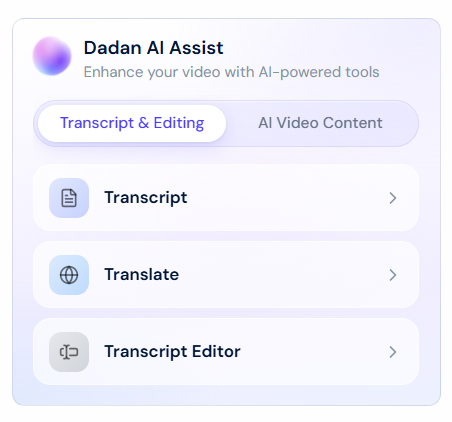
- In the Dadan AI Assist box, click the Tag button under AI Video Content, then click Generate.
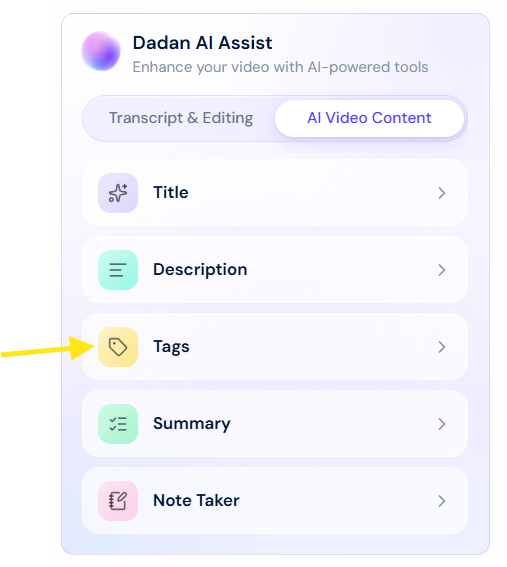
- Review the suggested tags against your agreed vocabulary. Remove the ones that do not match, then click Apply Tags. You cannot apply more than 8 tags per video.
- Add chapters to any video over three minutes so viewers can jump straight to the relevant section. Chapters work on embedded videos too, so they still function when the video is placed inside a help article.
- Attach the supporting material, such as the policy document, the linked spreadsheet, or the related article. This is what stops people from watching the video and then still having to hunt for the file it referenced.
But this is the part that determines whether any of this pays off. Dadan’s documentation on intelligent search states directly that if your videos are not transcribed and do not have tags and chapters, search results will only return videos, folders, and libraries.
Step 5: Group Related Videos Into Playlists
Group videos that belong to a sequence, such as a five-part new hire setup path, into a playlist.
Order them the way someone encountering the process for the first time would need them.
Share or embed the playlist as a unit, so the whole path travels as one link.
Step 6: Connect the Library to Your AI Assistant
Dadan MCP, launched on 20 July 2026, lets you connect your Dadan library to an AI assistant so people can query it in plain language instead of clicking through folders.
Dadan describes it as 70 tools covering recording, editing, publishing, translation, lead capture, and analytics, with the ability to search recordings by topic and move videos between folders by asking.
- In your AI client, add a connector and paste the endpoint https://mcp.dadan.io/mcp.
- Sign in through Dadan’s own sign-in with Google, Microsoft, or email. The gateway runs OAuth 2.1, so there are no API keys to manage and access is scoped to your account.
- Ask your assistant to find things in the library.
The MCP server is free to connect and works with your existing plan, including the free tier, and that what the assistant can do matches what your plan includes.
Best Practices for Managing a Video Knowledge Base
Maintaining a video knowledge base is a scheduled activity and the libraries that stay useful are the ones with a named owner and a recurring review date.
Everything in this section addresses the same failure. Knowledge bases do not die from lack of content. They die from accumulated wrongness, where enough entries are out of date that people stop trusting any of them.
Set a Review Cycle Before You Need One
Assign a review date to every video at the moment you publish it. 90 days for anything touching a fast-moving interface, twelve months for policy and orientation content. Put the dates in a shared calendar owned by one person.
Edit Instead of Re-Recording
When a process changes slightly, re-recording the whole video is why most knowledge bases go stale. Dadan’s transcript editor lets you cut and reorder segments by editing text, and you can trim sections or splice in a new clip without rebuilding the video.
Refreshing a 20-second section takes minutes. Re-recording a 3-minute video takes an afternoon once you count retakes.
Mark Outdated Videos Rather Than Deleting Them
When something is superseded, add a note at the start pointing to the current version and archive the old one. Dadan lets you archive videos to hide them without deleting, and restore them later.
Deleting outright breaks every link anyone ever shared, including the ones sitting in tickets from eight months ago.
Give Contribution Rights to More Than Managers
The people who know the answer to a recurring question are usually the people answering it, not the people managing them.
Assign Creator roles broadly and Viewer roles by default, then review what gets added rather than gatekeeping what can be.
Track What Gets Watched
Your analytics tell you which parts of the knowledge base are working. High views with low completion usually means the video is too long or the title promised something different from what it delivered.
Zero views over a quarter means either nobody needs it or nobody can find it, and those need opposite fixes.
Why Build Your Video Knowledge Base with Dadan?
Dadan handles recording, hosting, transcription, tagging, and retrieval in one place, so the searchable layer is generated where the video already sits instead of being assembled across three tools.
Most video knowledge base software makes you choose between a recorder that does not host well and a host that does not record.
The reason that matters here is not convenience but that transcripts, tags, and chapters have to be attached to the video at the source, and every handoff between tools is a place where that metadata gets dropped.
- Search runs across videos, folders, libraries, teams, chapters, transcripts, and tags, with filters for content type, time range, and specific libraries or teams.
- AI Assist generates transcripts, titles, descriptions, tags, chapters, and summaries from the transcript.
- Team Spaces separate shared knowledge from personal recordings, with Viewer and Creator roles controlling who maintains what.
- The Resources tab attaches supporting documents and links directly to the video
- Playlists sequence related videos into learning paths.
- Password protection, expiry dates, and domain-level access control govern who can reach sensitive internal content.
- Subtitle translation covers a stated 180 languages through MCP, useful for distributed teams.
- Dadan MCP connects the library to an AI assistant on any plan, including free.
Dadan holds a 4.8 out of 5 rating on G2 across 60 reviews, where reviewers repeatedly cite transcription and SOP creation as primary use cases.
Conclusion
A video knowledge base is worth building when the same questions keep arriving and the answers keep coming from the same three people.
Getting there is about whether you built the retrieval layer, which means transcripts on everything, tags with agreed rules, chapters on anything long, and a review date with a name attached.
Start with your ten most repeated questions. Record them short, tag them consistently, and put a review date on each one before you move to the next batch.
FAQs
Why is a video knowledge base better than traditional documentation?
It is better for anything visual, where showing the actual screen is faster than describing it and where interfaces change faster than screenshots get updated. Written documentation still wins for reference material people scan rather than follow, so most teams get the best result running both.
What types of videos should be included in a business knowledge base?
Short, task-focused recordings that answer one recurring question each, such as software walkthroughs, troubleshooting steps, policy explanations, and onboarding setup. Long meeting recordings and general training courses belong in an archive rather than a knowledge base.
How do AI transcripts improve a video knowledge base?
Transcripts make the spoken content of a video searchable, so someone can find the exact moment a topic was mentioned without watching the whole thing. In Dadan they are also a prerequisite, since AI-generated tags, chapters, titles, and summaries all depend on the transcript being generated first.
How can employees quickly search and find videos?
Dadan’s intelligent search scans videos, folders, libraries and teams, chapters, transcripts, and tags, with filters for content type, time range, and specific libraries.
Can I build a video knowledge base for remote and hybrid teams?
Yes, and distributed teams are where the returns are largest, because a searchable library removes the timezone delay between asking a question and getting an answer. Team Spaces with Viewer and Creator roles let you control who maintains content and who consumes it, regardless of where people work.
How do I keep a video knowledge base organized?
Decide the folder structure and the tag vocabulary before anyone records, name folders after the questions people ask rather than after teams, and use a consistent title format. Then assign every video an owner and a review date, because organization degrades through neglect rather than through bad initial structure.
Does Dadan provide features for building a video knowledge base?
Yes. Dadan covers recording, hosting, Team Spaces, folders, AI transcripts and tags, chapters, playlists, a Resources tab for supporting documents, transcript-based search, access controls, and analytics. Dadan MCP additionally connects your library to an AI assistant so people can query it in plain language, and it works on every plan including free.