Most places you would publish a voice recording, including YouTube and Instagram, accept video files and not standalone audio, so an audio-only recording has to become a video before it can go there.
Audio to video conversion means pairing your sound with something to look at, usually a waveform, a still image, or captions, and exporting the result as an MP4.
You can do it in a browser in a few minutes, and if you record the audio in Dadan, the waveform video is generated the moment you stop recording.
What Is an Audio-Only Recording?
An audio-only recording is a file that holds sound and nothing else. A voice memo on your phone, a podcast episode exported from an audio editor, a recorded interview, and a lecture captured on a laptop microphone are all audio-only recordings, and they usually arrive as MP3, WAV, or M4A files.
In a recorder, “audio-only” means the camera is off and the screen is not captured, unlike a screen recording with voiceover.
Dadan’s audio-only mode, added in the Dadan 2.0 release in June 2026, records your microphone without the camera and saves the result as a video with a clean background and a moving waveform, which you can download as either an MP3 or a video file.
Why Turn Audio Recordings Into Videos?
Turning a recording into a video changes where it can go. As a video, it can go on YouTube, into a social feed, into a course platform, or behind a link that plays in any browser, and each destination rewards the conversion differently.
YouTube Only Takes Unconverted Audio Through a Podcast RSS Feed
YouTube’s standard upload accepts video files, so an MP3 has to be converted first. The one exception is for podcasters. YouTube Studio lets you submit a podcast RSS feed, and YouTube then creates a static-image video for each episode, using your show’s cover art as the picture. YouTube’s own creator blog presents this as the route for shows with an audio-only back catalog.
The RSS route gives you a cover image and the audio, and nothing more. For a waveform, captions, a vertical clip, or anything that is not a podcast episode, you still convert the audio yourself.
Captions and Transcripts Make Spoken Audio Usable
If you scroll with the sound off, a waveform on its own tells you nothing, and captions burned into the frame fill that gap.
A transcript also makes the recording searchable. In Dadan, library search covers transcripts as well as file names, so a voice note from three months ago is findable by what you said in it.
A Still Image Holds Fewer Viewers Than Motion
A static image with audio gives viewers nothing changing on screen, and podcast video producers warn that this can drag down retention, one of the signals YouTube weighs when recommending videos.
A former member of YouTube’s podcast partnerships team takes a gentler view, arguing that a static image is a fine way to get a show onto the platform before investing in full video.
Your opinion on YouTube channel with static image only?
by inpodcasting
Both positions are reasonable. A moving waveform with captions sits between them, costing a few minutes of work and giving the eye something to follow.
How to Create a Video Using an Audio-Only Recording
In Dadan, you can record the audio and have the waveform video built for you, or bring in an audio file you already have and assemble the video in the editor.
Step 1: Open Dadan and Switch the Recorder to Audio-Only
Sign up to the Dadan web app and start a new recording. Choose the audio-only option so the camera stays off and your screen is not captured.

Pick your microphone before you start. If you are unsure which input your browser is using, Dadan’s free mic and webcam tester shows the level for each device, so you catch a muted or wrong mic before you talk for ten minutes into silence.
Step 2: Record and Keep Your Notes Beside the Canvas
Hit record and talk. Because nothing is on screen, you can read from notes as much as you like. The Dadan web recorder also lets you pin private sticky notes beside the recording canvas, and they never appear in the final video.
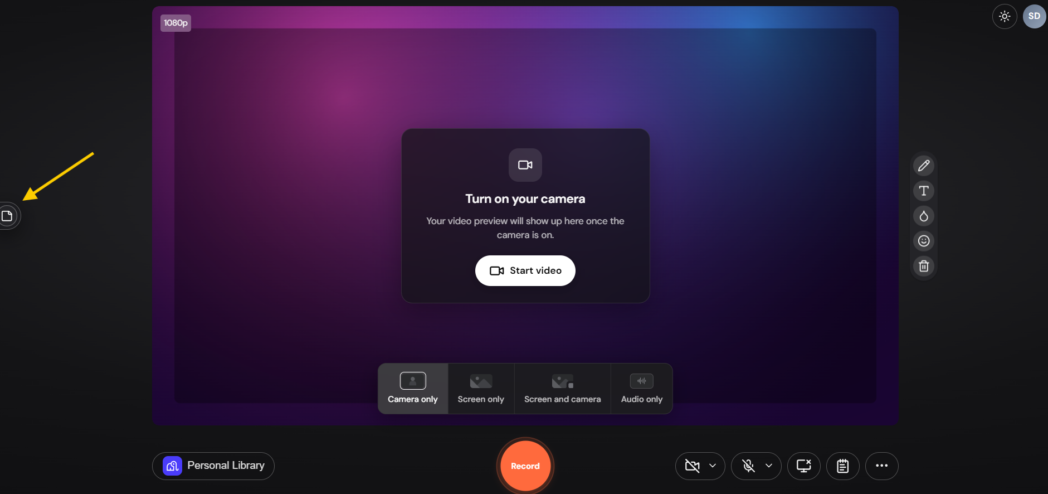
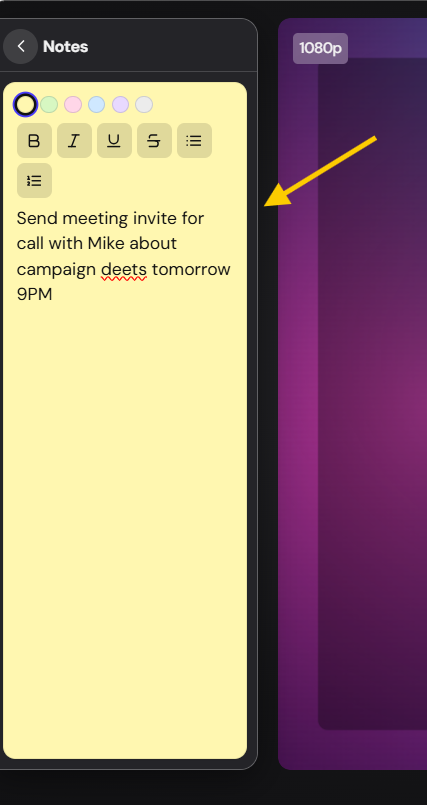
Alternatively, you can also use Dadan’s teleprompter to read your script.
If you lose your place, pause and restart the sentence. Silences and false starts are easy to remove in Step 4.
Step 3: Stop Recording and Check the Waveform Video
When you stop, Dadan saves the recording as a video with a clean background and an audio waveform that moves with your voice. It lands in your library like any other recording, and AI Assist generates a transcript you can read alongside it.
On the Free plan, automatic transcription covers up to 10 minutes per video.
Step 4: Edit the Audio by Editing the Transcript
Open the recording in the transcript editor. Deleting words from the text deletes them from the audio, so you fix a false start the same way you would fix a typo.

The editor can also remove filler words with AI, detect and cut silences, mute a phrase by selecting its text, and reorder segments.
For a short social version, select the strongest passage and create a clip from that selection.
Step 5: Add Captions, Images, or a Vertical Format in the Editor
The waveform version is ready to share as it is. If the video is headed to a social feed, open it in Dadan’s video editor to add captions, bring in an image or stock footage, apply your Brand Kit colors and logo, or resize it to a vertical frame for Shorts and Reels.
Step 6: Download It as an MP3 or Video, or Share the Link
Download the result as a video for YouTube or social, or as an MP3 for a podcast host. You can also share the Dadan link, which plays in any browser and can be password-protected or set to expire.

But if you already have an audio file, upload the file to the Dadan video editor, place it on the timeline, and add a cover image, stock footage, or captions before exporting. The Free plan caps uploads at 100 MB per file, so convert long WAV recordings to MP3 first.
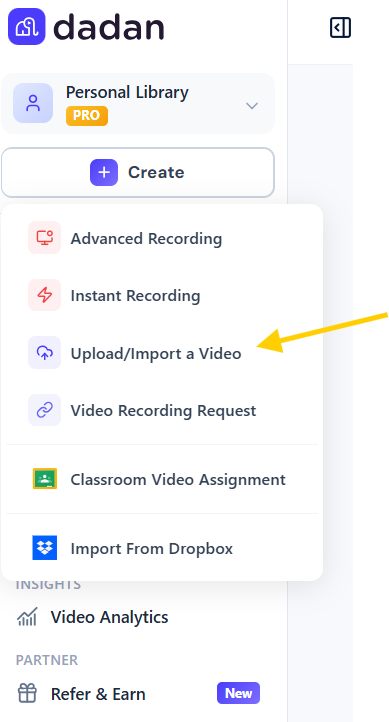
How to Turn Audio Into a Waveform Video
An audio waveform video shows a graph of your recording’s loudness moving in time with the sound, and podcasters call the short, captioned version an audiogram.
Which way you make one depends on whether the audio already exists and how comfortable you are with software.
Record It in Dadan and the Waveform Is Built for You
If the recording has not happened yet, Dadan’s audio-only mode is the shortest path, because the waveform video is created when you stop, along with a transcript and a shareable link.
Audio to Video in the Browser With a Waveform Editor
Most browser editors that make waveform videos follow the same pattern. You upload the audio, open the Elements panel, pick a waveform style, place it over a background, and export.
The choices that most affect how the result looks happen around the waveform rather than inside it.
- Choose the aspect ratio before you design anything, since 16:9 suits YouTube, 9:16 suits Shorts, Reels, and TikTok, and 1:1 works in most feeds.
- Put the waveform in the lower third of the frame and leave the middle for captions or a title.
- Use your cover art or a photo of the speaker as the background so viewers know whose voice they are hearing.
- Pick a passage for social clips that makes sense without the rest of the episode around it.
Make a Waveform Video for Free With FFmpeg
FFmpeg is free, open-source command-line software, and it includes a filter called showwaves whose job is converting input audio into video output.
If you are comfortable in a terminal, it can turn an MP3 into a waveform video, or pair the audio with a still image for a full episode where motion matters less, without uploading anything.
A waveform video is much larger than a still-image video of the same length, because the waveform changes every frame while a still image barely changes at all. That size gap is why full episodes usually go out as still images while waveforms are kept for clips.
What Types of Content Can You Create From Audio Recordings?
Any recording where the words carry the value can become a video. The format you pick depends on who is listening and where they will find it.
Podcast Episodes and the Clips
A full episode can go to YouTube as a still-image or waveform video, and its best two minutes can become a vertical clip with captions.
In Dadan, you can record the episode in audio-only mode, tighten it in the transcript editor, and cut clips from transcript selections in the same session, without moving files between apps.
Voice Updates for Colleagues in Other Time Zones
Some updates are easier to say than to write. An audio-only recording shared as a Dadan link plays in the browser with the transcript underneath, and time-coded comments let colleagues reply to the exact moment they have a question about.
Lesson Recaps and Readings for Students
You can record a lesson recap and share it as a video assignment through Dadan’s Google Classroom integration, with in-video quizzes to check understanding.
Customer Stories
Plenty of customers will talk but would rather not appear on camera. Dadan’s Request a Video link lets someone answer your question by video, audio, or text with no account required, and the reply lands in your library with a transcript.
An audio answer can then be edited into a captioned clip for your site, as long as you have the customer’s permission to publish it.
Best Tools for Turning Audio Into Videos
The right audio to video converter depends on where your audio comes from and what the video needs to do afterward. Pricing below was checked in October 2026, and plans change often, so confirm it on each vendor’s site before you buy.
1. Dadan
Dadan is a browser-based video platform where you record, edit, host, and share video, that includes audio. Its audio-only mode records your microphone with the camera off and turns the recording into a waveform video automatically, which you can download as a video or an MP3.
The difference from a single-purpose converter shows up after recording. You edit by transcript, add captions and your Brand Kit, and share a password-protected link or embed.
You can also place lead forms or a CTA with Calendly booking inside the video, so an audio clip promoting a webinar can collect sign-ups from the same player.
Dadan is rated 4.8 out of 5 on G2 across 85 reviews as of October 2026.
Best For
- Anyone who wants the waveform video, the MP3, and a transcript from one recording
- Podcasters who edit by transcript and cut clips in the same tool
- Marketers turning audio into captioned clips with a lead form inside
Key Features
- Audio-only recording saves your voice as a waveform video, downloadable as MP3 or video.
- The transcript editor removes filler words and silences and creates clips from selected text.
- The timeline editor adds captions, stock media, Brand Kit assets, and vertical resizing.
- AI Assist generates transcripts, titles, chapters, and summaries.
- Quizzes, polls, lead forms, and CTAs sit inside the video player.
Pros
- You get a finished waveform video without designing anything.
- One recording gives you the video, the MP3, and the transcript.
- Listeners open a browser link, with no app or account needed.
- Lead forms and CTAs inside the video turn listens into sign-ups.
- Paid plans start at $8 per user per month billed annually.
Cons
- The Free plan limits each recording to five minutes, exports at 720p, and adds a small Dadan watermark.
Pricing
- Free
- Lite: $8/mo
- Pro: $14/mo
- Business: $14/seat/mo
2. Descript
Descript is a text-based audio and video editor popular with podcasters. Waveforms are a layer added from the Elements panel in four styles, and you can assign one to a single speaker so it moves only when that person talks.
It makes the most sense if you already produce the show in Descript; as a converter alone, it is more tool than you need.
Best For
- Podcasters who already record and edit in Descript
- Interview shows where the waveform should follow each speaker
Key Features
- Waveform layers come in four styles with adjustable size, fidelity, and magnitude.
- A waveform can be tied to a single speaker label.
- Studio Sound cleans up voice recordings with AI.
Pros
- Speaker-specific waveforms are rare among these tools.
- Editing and audiogram creation happen in one project.
- Cutting audio is as fast as deleting text.
- Studio Sound rescues rough recordings before you export.
Cons
- Each paid plan caps transcription hours per month.
- It takes longer to learn than a single-purpose converter.
Pricing
- Hobbyist: $16/seat/mo
- Creator: $24/seat/mo
- Business: $50/seat/mo
- Enterprise: Custom
3. Headliner
Headliner is built for podcast promotion. You pick an episode or upload audio and turn a clip into a captioned audiogram, and its automatic audiograms post new clips to social channels and YouTube each time you publish an episode.

It is much less useful for internal updates, lessons, or anything you want to keep private behind a link.
Best For
- Podcasters who want clips posted to social after every new episode
- Shows that need captioned audiograms without editing skills
Key Features
- Automatic audiograms post new episode clips to social platforms and YouTube.
- Transcription and captions cover 100+ languages.
- Exports go up to 1080p.
Pros
- Episode-to-clip automation saves the most time for weekly shows.
- Captions work in 100+ languages.
- Apple Podcasts templates make clips look polished with little effort.
- You can start free with no credit card.
Cons
- It is built around podcasts and does little for other kinds of audio.
- Free exports carry a Headliner watermark.
Pricing
- Free
- Basic: $9.99/mo
- Pro: $25.99/mo
4. Kapwing
Kapwing is a browser-based video editor with a Sound Wave Generator. You upload audio, select the track, and click Add Waveform, then switch between six styles.

Because it sits in a full editor, you can also add subtitles and stock media behind the wave, which makes it a good fit for one-off styled clips.
Best For
- Social media managers making the occasional styled waveform clip
- Creators who want waveform, subtitles, and stock media in one browser editor
Key Features
- Six waveform styles can be switched and recolored after you add them.
- Uploads accept MP3, WAV, FLAC, OGG, and WebM audio.
- AI noise removal and automatic subtitles run in the same editor.
Pros
- Waveform styling is quick and visual.
- Six styles cover most looks without custom design work.
- Subtitles and noise removal sit in the same editor.
- Nothing needs to be installed.
Cons
- Free exports are watermarked and capped in length.
- There is no automatic waveform from recording, so every video is assembled by hand.
Pricing
- Free
- Pro: $16/seat/mo
- Business: $50/seat/mo
- Enterprise: Custom
Conclusion
Match the format to the length of the recording. A full episode or long lecture works as a still image or RSS upload, a two-minute clip needs a waveform and captions to hold attention in a feed, and an internal voice update works best as a link with a transcript under it.
If you record the audio in Dadan, every one of those versions comes from the same recording, with the waveform video built automatically and the MP3 one click away.
Record your next voice note on Dadan’s free plan and see how it plays as a video.
FAQs
How do I turn an audio recording into a video?
Pair the audio with a visual and export it as a video file, usually an MP4. The quickest way is to record in Dadan’s audio-only mode, which saves the recording as a waveform video automatically. For an existing file, upload it to a video editor and add a waveform, an image, or captions.
How do I create a video from an audio file?
Upload the file to a video editor, place it on the timeline, and add a background image, a waveform, or captions before you export. If you prefer free software, FFmpeg combines an MP3 with a still image or generates a waveform video with a single command.
Can I turn a voice recording into a video?
Yes. A voice memo converts the same way as any other audio file. If you record it in Dadan’s audio-only mode, it becomes a waveform video with a transcript as soon as you stop recording.
What is an audio waveform video?
It is a video that shows an animated graph of your audio’s loudness moving in time with the sound. Podcasters often add captions and cover art to the waveform and call the result an audiogram.
What is the best tool for converting audio to video?
Dadan is the strongest choice if you want to record and share from one place, since its audio-only recorder creates the waveform video for you. Headliner suits automated podcast promotion, and FFmpeg suits free batch conversion.
Can I create a video without turning on my camera?
Yes. In Dadan, you can record audio only, which produces a waveform video, or record your screen with your voice and leave the camera off. Either way, your face never appears in the video.
Can I download an audio recording as an MP3 or video file?
In Dadan, yes. Audio-only recordings download as an MP3 or as a video file, so you can send the MP3 to your podcast host and post the video to YouTube from the same recording.