











Request Videos from Anyone
Let anyone explain things clearly without calls or meetings
Send the link to your customers or anyone you know. They tap on the link and hit record. No signup or download required.
Join over 3,000 + companies creating videos with Dadan


How to Request Videos from Customers in Seconds
Step 1
Sign up Dadan for free
Create your free dadan account and install the Windows or Mac app, or use the Chrome extension.
Step 2
Create your recording link
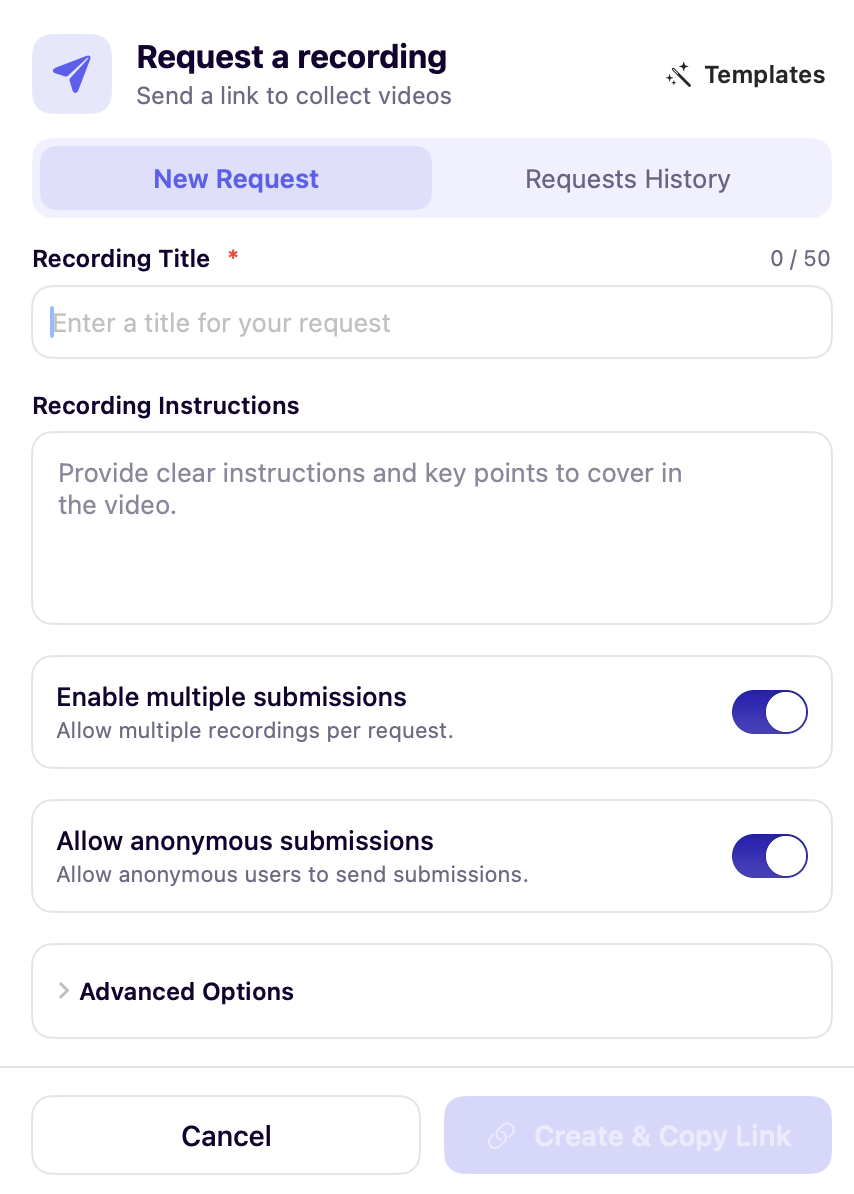
Fill out the request form to generate the link, then copy and share it with anyone.
Step 3
Collect responses
They can record and submit their video through the link you shared.
Step 4
Get notified
You’ll receive a notification as soon as their video is recorded, so no follow-ups are needed.
Why Customers Choose Dadan for Video Requests

Ways to Use Request Video
Collect Customer Testimonials
Video testimonials are one of the best ways to display social proof. When a user sees another user benefitting from your product or service, it boosts their trust in you.
With the request videos feature, you make it easy for your customers to record a video.
With no setup required, they can record and share the video with you instantly.


Capture Product Feedback
Video feedback is more detailed than written feedback. Imagine recording a screen, showing exactly the areas that can be improved. It’s clearer and a classic example of show and tell.
Product managers and developers can use the request video to get such video feedback. By sharing the link, you help users to act fast and record their thoughts when they’re fresh.
Customer Support Cases
Your customers might not always have the right words to explain their queries. What follows is a chain of back-and-forth emails, multiple threads, and an unsatisfied customer.
Your customer support team can cut through all of that by sharing a video link. The customer records a quick video, your team knows exactly what needs to be done, and you have a happy customer.


Gather Team Updates
Online video calls are instant, but they also hinder deep work in remote teams. Productivity takes a hit, and team morale crumbles over time.
Asynchronous video updates are a good option, especially when your team is deeply focused on a project. Create a request video link, set a deadline, and let your teammates record the update in their time.
Collect Quick Inputs from SMEs
Building training content often depends on timely inputs from Subject Matter Experts. Instead of scheduling calls or chasing long documents, you can gather clear explanations through a quick video request.
Share the dadan request link with your SME, add instructions, and they record whenever they’re free. You get accurate context and examples without delays.

Meet Our Happy Customers

"At Youfibre, we’re a remote-first company with team members all over the UK. Dadan lets me work on projects and tasks with my team and keeps us moving fast."
Craig Tomkins
Director of Strategy & Operations

“ I love Dadan, it helps me communicate and get feedback from clients without needing meetings all the time. We use the interactive quizzes to speed up sign-off. ”
Jess Silver
Marketing Agency Owner

"Great tool! I work with retail partners all over the world and Dadan helps me keep those relationships strong."
Lewis Lingard
International Trade Sales Manager

Features that Make Video Requests Easy
One-Click Video Requests
Create a single link and share it with anyone. Once they record a video, you get notified automatically.
High-Quality Recording
Any user can record the video in 4K quality. You decide the recording mode, or let them decide that.
Secure & Private
Dadan’s strict data encryption methods ensure that your entire conversation remains private and safe from unauthorized access.
Easy Sharing
After you create a link, copy it with one tap and send it via email or any other messaging platform.
Customizable Request
Decide on the video title and customize the request message, so you get maximum response from your audience
No Downloads Required
Your users don’t have to sign up or download an app. They click on the link, and then hit the record button
Request Videos from Anyone in Minutes using Dadan
FAQs
Video request is a feature that lets you create a link to share with anyone to record a video. The person receiving the link only has to click on the link to record the video, no downloads required.
Head over to the dadan web app, tap the Create button, then Video Recording Request. Fill out the request form and click on the Create recording link button.
No, they don’t have to download an app or create an account. They only have to click on the link and then hit record.
Yes, you can customize the message by adding a title, video instructions, even a password and a deadline.
After the video link is created, copy it and share it with them via email or your preferred messaging app.
People can use their laptops to record the video.
Yes, you can set the limit from the request video form. You can enable the toggle to accept multiple video recordings from one link.
You will receive a notification in your dadan dashboard when someone submits a video using that link
Yes, videos are secure, and the link is private only to you and the user receiving it.
You can request videos to get customer testimonials, resolve support tickets, and capture product feedback to grow your business.
Yes, multiple videos can be recorded with the same request video link.
There are no additional costs for sending a request video link. However, you must be in the Pro plan to access this feature.