You’ve probably experienced this: your team is spread across time zones, meetings happen at awkward hours for someone, and important decisions get buried in long recordings that no one has time to watch.
How do you keep everyone aligned when they’re not online at the same time? How do you capture the context from a brainstorming session so everyone is on the same page the next day? Sure, better scheduling is an answer, but that doesn’t work every time.
Asynchronous communication works best when it’s thoughtful, context-rich, and accessible to everyone. AI transcription makes this possible by turning every spoken discussion into searchable and shareable knowledge.
Why Asynchronous Work Needs Better Context
Asynchronous work doesn’t use real-time communication. No face-to-face interaction; no feedback from non-verbal cues like tone, body language, and facial expressions. The sender and the receiver don’t interact at the same moment, and they’re fine with it. But if the messages are not well-structured or lack details, misinterpretations roll in like uninvited guests and cause a series of confusion.
As real-time communication options take a backseat, writing occupies the entire front row in asynchronous communication. But in writing, the how of a message can easily get lost. For example, humour, urgency, or subtle disagreements that are clear in a meeting may be misread or missed entirely in a written async update.
That’s why asynchronous workflows must have meticulous clarity and accessible documentation. Remote teams thriving in an asynchronous setup build “handbook-first” cultures, where documentation stores decisions, workflows, and project backgrounds. This ensures that anyone can catch up and contribute even if they join hours or days later. This level of context prevents misinterpretations and keeps distributed teams aligned.
Amir Salihefendić, founder and CEO of Doist, offers a practical perspective on this shift:
“I think, like, it (writing) forces people to think more—especially, you know, to be concise. If you actually promote clear writing, concise writing, I think it can convey information much better than, like, a 20-minute video or something like that.”
At Doist, one of their key principles is: “Everyone is a Writer.” Amir explains that asynchronous communication means every employee must aspire to be a great writer because “writing is a tool for thinking.” Articulating ideas in writing helps spot gaps in reasoning before they turn into problems for the team.
How AI Transcriptions Enhance Asynchronous Collaboration
From what you read so far, you know documentation and clarity are two cornerstones of successful asynchronous work. And as Amir emphasized, async communication requires thoughtful, concise writing to prevent miscommunication and keep teams aligned.
But here’s the challenge: not all workplace communication happens in writing. Critical discussions still happen over video calls. These spoken exchanges often contain valuable decisions, insights, and context. Being in audio and video formats, it’s difficult to search, reference, or share the content with team members who weren’t present.
This creates a fundamental gap in async workflows: how do teams capture transient spoken insights and transform them into the permanent, searchable records?
The answer is AI transcription.
Converting Sound into Searchable Context
AI transcription transforms words into tangible, digital assets. It converts conversations into permanent text archives. Every decision, insight, and discussion point becomes part of an organized, accessible knowledge base.
This helps asynchronous teams in two ways:
Searchable Records
Instead of scrubbing through hour-long recordings or relying on fragmented memory, teams can search transcripts for specific keywords or action items. Within minutes, they can retrieve the much-needed context and get along with their daily work.
Knowledge Retention
AI transcription ensures that institutional knowledge doesn’t vanish when a meeting ends. New team members can read through past discussions to understand how decisions were made, why certain directions were chosen, and how projects evolved. This reduces the need for repetitive explanations.
Boosting Efficiency and Focus
AI transcription automates what was historically a manual, labour-intensive process:
Time Savings
Manual transcription of a one-hour meeting can take up to six hours. AI transcription tools complete the same task in minutes, cutting transcription efforts by up to 90%.
Actionable Summaries
Beyond converting speech to text, modern AI transcription tools condense lengthy transcripts into concise summaries. They also automatically extract action items, next steps, and task assignments. This makes post-meeting follow-ups seamless as team members can quickly grasp outcomes without reading pages of a transcript.
Promoting Inclusivity and Alignment
AI transcription ensures that everyone can access crucial information. Here’s how it happens:
Accessibility
Real-time captions and written transcripts support team members with hearing impairments or auditory processing challenges. For non-native speakers, clear written text bridges language gaps and improves their comprehension
Catch-Up Mechanism
A developer in a different time zone can review detailed, searchable transcripts from a meeting that happened during their off-hours. They don’t have to bug their teammates or watch an hour-long video recording to get the context.
Eliminating FOMO
With comprehensive transcripts available, no one feels left out or disadvantaged for missing a live session. This reduces pressure to attend every meeting in real time and provides the clarity that async work demands.
The Game Changer: AI Transcriptions Inside Dadan
Dadan is a screen recording and video communication platform built for async teams. It helps you capture everything from product demos to team updates, client calls to training sessions and turns them into shareable knowledge.
At the heart of dadan’s asynchronous capabilities is its AI transcription feature. It transforms any video into a searchable, accessible record that your team can reference anytime, anywhere.
How Dadan’s AI Transcription Works
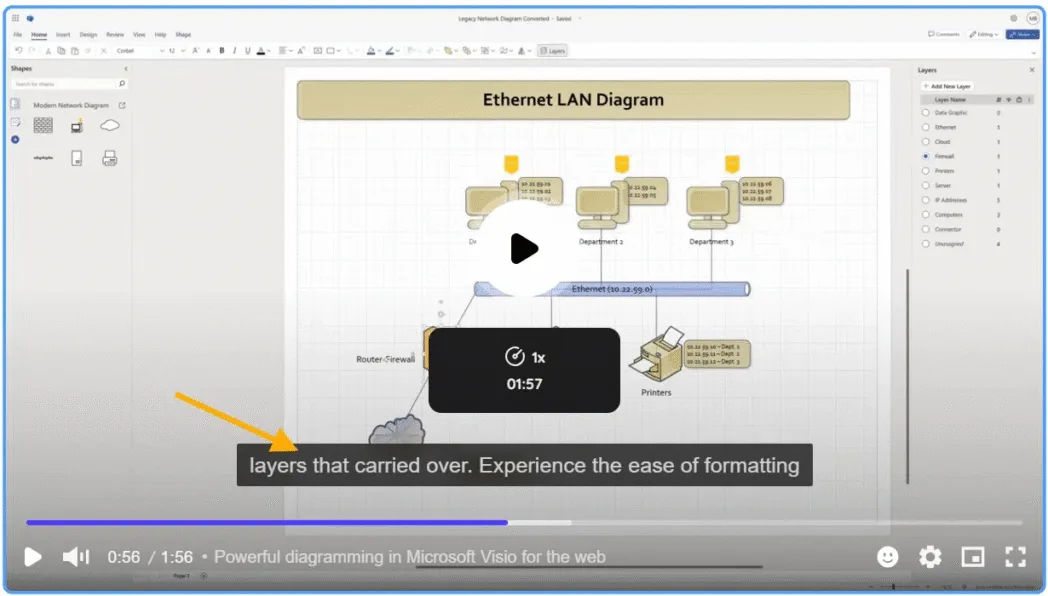
When you record a video in Dadan, the AI transcription feature uses advanced speech recognition technology to convert spoken audio into text. Your team can download this transcript to search for keywords or critical points discussed during the live call. You can also upload the transcript as a caption, so it’s easily accessible even for those with limited language proficiency.
How to Generate a Transcript in Dadan
The process is straightforward:
1. After recording or from your Personal Library, navigate to the video playback screen.
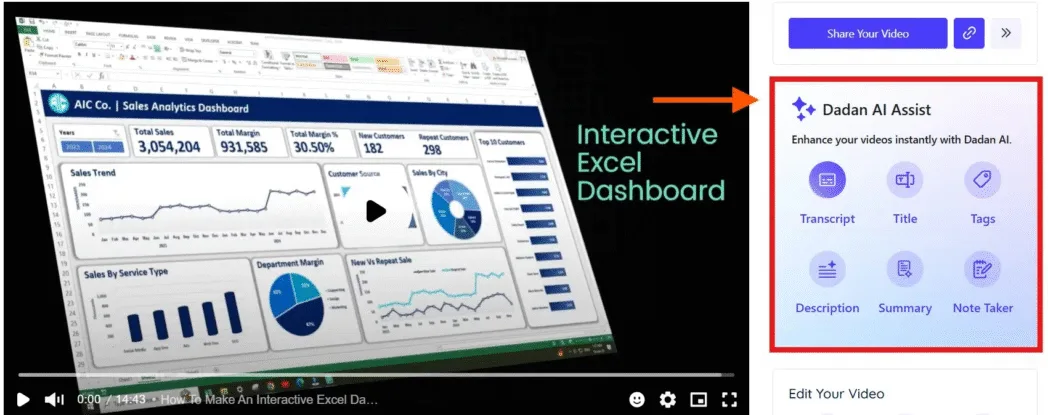
2. Find the Transcript button in the Dadan AI Assist box
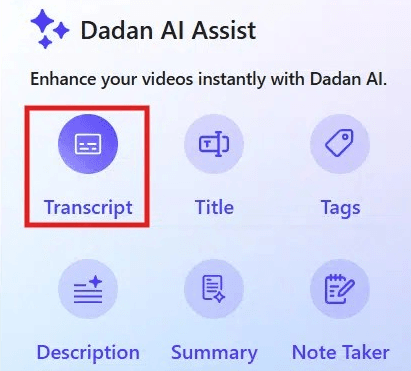
3. Choose the language spoken in your video

4. Click Generate Transcript and confirm

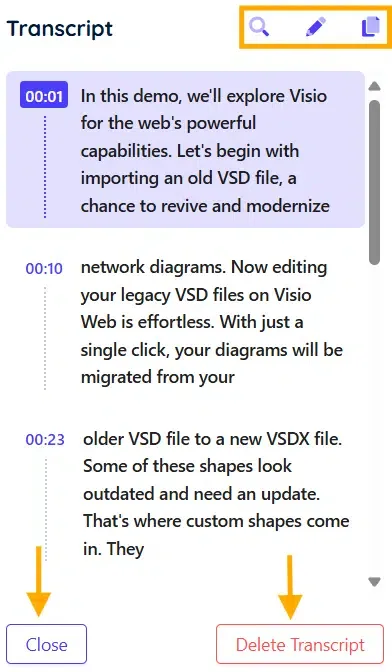
5. Once processing completes, your searchable transcript appears with options to search, edit (for admins), or copy the text
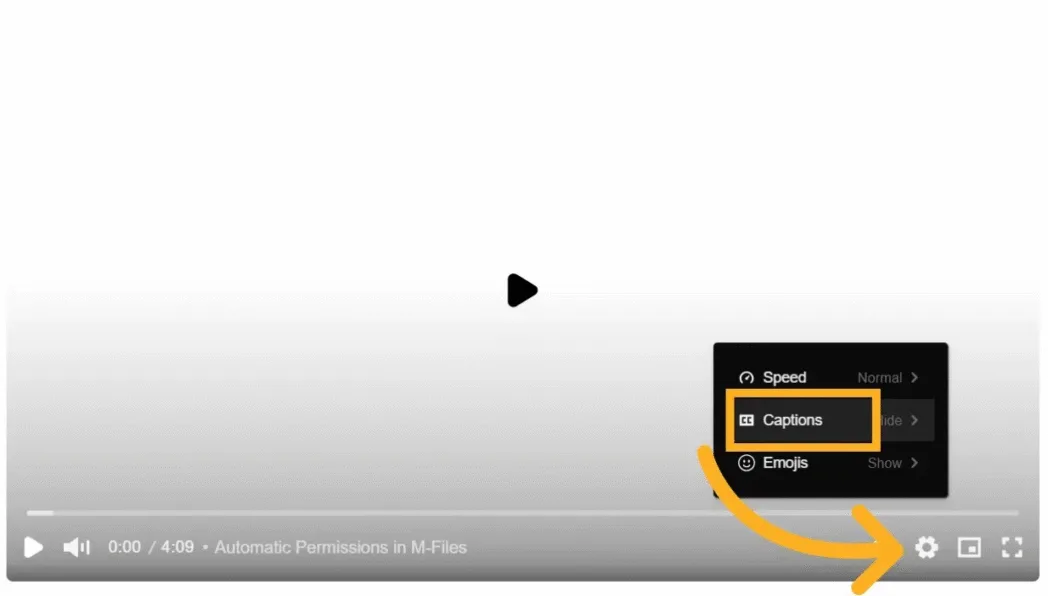
6. Click on the settings menu, then on Captions to view the video captions
Use Cases
By now, you know how clarity and documentation make async communication smooth. You also know how dadan can be a great tool to generate transcripts of video recordings with one click. But how does AI transcription work in real-life scenarios? Let’s explore:
Product Teams
Design reviews, feature discussions, and bug triages often happen over video calls or screen recordings. Transcripts let product managers and engineers refer back to decisions, clarify requirements, and quickly search for action items, even weeks after the meeting. It’s also useful when onboarding new team members.
Marketing Teams
Campaign planning and client interviews rarely follow a script. Transcriptions help marketers capture creative ideas, distill feedback, and build content or messaging from actual conversations. They can also use transcripts from webinars and video podcasts to create social media snippets, blog posts, or even internal case studies.
HR and People Ops
Hiring processes, onboarding training, and policy meetings generate a lot of valuable discussion. Transcripts make it easy to document interview feedback, share training material, and confirm policy changes with the wider team. If someone misses a session, they can catch up by reading a summary instead of watching a full video.
Customer Support
Support calls often contain user pain points, product issues, and feature requests. Transcribing these sessions creates a searchable record for troubleshooting and helps teams spot recurring problems and trends. It also makes compliance audits and customer onboarding simpler.
Training and Enablement
All-hands meetings, skill-building sessions, and product walkthroughs can be easily transcribed. Written transcripts are invaluable for learners who process information best in text form or for those participating from different time zones.
Get Started for Free
We explored how asynchronous work relies on clear context and why AI-powered transcriptions are such a strong tool for distributed teams. If you’re ready to leap, but don’t know where to start, head over to the dadan website. Sign up with your email address and get access to a 14-day, no-nonsense free trial. During this trial, you will have access to all the AI features, including AI transcription. Upload a recording and find out for yourself if dadan is the right tool for your async team.
Tap on this Sign up link to create your free account.
FAQs
What is AI transcribing?
AI transcribing is the process of using artificial intelligence, specifically automatic speech recognition (ASR) and natural language processing (NLP). It converts spoken language in audio or video into written text. It’s much faster and often more cost-effective than manual transcription, and can even work in real time for live conversations.
What is the future of work with AI agents?
The future of work with AI agents is more automated and efficient. Teams will get to focus on creativity, analysis, and strategy, while routine tasks will be handled by intelligent tools. AI agents will help organize information, automate scheduling and documentation, support decision-making, and increase inclusivity for distributed teams.
What is asynchronous work?
Asynchronous work means communication happens at different times, instead of requiring everyone to be present simultaneously. It’s common in remote or distributed teams, letting team members collaborate, share feedback, and respond whenever it suits them, across time zones and schedules.
How do AI transcriptions support asynchronous communication?
AI transcriptions make spoken conversations instantly accessible as searchable text, so anyone can catch up on meeting discussions, find specific decisions, or reference past conversations without needing to attend live or review hours of recordings.
How does Dadan’s AI transcription feature work?
Dadan uses advanced AI to automatically transcribe spoken audio from your uploaded or recorded videos. After selecting the transcription option, Dadan quickly generates searchable and editable text. If any corrections are needed, you can easily make edits directly in the interface. The transcript is immediately available for reference or export
Can I use AI transcriptions for training or onboarding videos?
Yes, AI transcriptions are ideal for training and onboarding videos. They make content accessible for all team members, help create searchable documentation, and allow quick review and retrieval of information for future reference.
How accurate are Dadan’s AI transcriptions?
Dadan’s AI transcription is highly accurate, often up to 99% for clear, high-quality recordings. If there are any mistakes, users can edit the text easily. The tool supports multiple languages and enables rapid correction, making it suitable for a wide range of business needs.
Are the transcriptions searchable and shareable?
Yes, transcriptions produced by AI are searchable for specific keywords, decisions, or topics, and can be shared as digital text files. This makes it easy for teams to find and distribute key information
How is AI transcription better than manual note-taking?
AI transcription is much faster, turning hours of audio into minutes of text. It reduces errors from missed details, is more cost-effective for large volumes, and lets teams automate documentation for meetings.
Recommended Readings:
- 10 Tips for Better Async Video Communication
- Why Asynchronous Communication Is Changing the Way We Work
- 10 Best Asynchronous Collaboration Tools Of 2026
- How to Create a Video Resume that Gets Noticed