
You can record a strong demo and still get nothing back from it. The viewer watches, nods along, and closes the tab, and you never find out who they were or how to reach them.
Adding a lead form to video fixes that by asking for a name and email inside the player, at the moment interest is highest, instead of hoping the viewer finds a form somewhere else after they leave.
What Are Video Forms?
A video form is a lead-capture form built into the video player itself, so a viewer enters their details at a set point in the video instead of on a separate page. It behaves like a scene in the video you decide to insert.
You control when it shows up. When the viewer reaches that second, the video pauses, the form appears over the frame, and playback picks up again the moment they submit.
Nothing opens in a new tab, and nothing pulls them out of what they were watching.
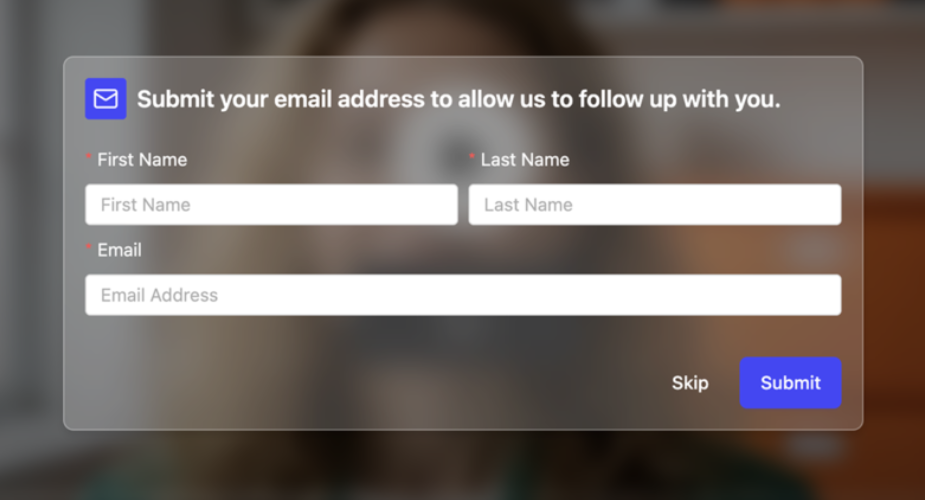
A Dadan video form collects name, email, and phone number, and you choose which of those to ask for and how the form reads.
A CTA button is where the form collects information, the button moves the viewer somewhere, such as a booking page, a trial signup, or a pricing page. You can run both in the same video, a form to capture the lead and a button to point them at the next step.
Benefits of Using Video Forms for Lead Generation
Video forms capture leads at the exact moment attention is highest, which is usually the point a separate landing page never reaches. By the time someone finishes a video and hunts for a form elsewhere, most of them are already gone.
A form inside the player closes that gap. The viewer is already engaged, already convinced by whatever they just watched, and the ask arrives before that feeling fades.
- You capture intent at its peak instead of after the viewer has clicked away.
- You remove the extra click to a landing page, which is the step where most people drop off.
- You tie each lead to the exact video they watched, so your follow-up already knows what caught their interest.
- You qualify while they are engaged by asking for the one field that helps your team prioritize.
- You keep every lead in one place, routed straight into your CRM without manual export.
The result is a video that does two jobs at once. It explains your product and it collects the people who wanted more, without you stitching a recorder and a form tool together.
When Should You Use Video Forms?
Use a video form whenever a viewer has to watch something valuable before you ask for anything, so the request feels earned. The technique works best on high-intent content where the viewer is leaning in.
For example:
- Product demos where you show the value first, then ask for details from the people who watched to the end.
- Gated educational content where you give a genuinely useful tutorial or breakdown, then ask viewers to sign up to unlock the rest.
- Sales qualification where a mid-video form captures the company or role that tells your team who to call back first.
- Event and webinar promotion where you pitch the session in a short video and collect registrations on the spot, with no separate signup page.
- Course or training previews where interested viewers enroll right after the preview ends, while motivation is still high.
- Campaign videos where you drop one video across channels and every view can turn into a captured lead.
If the video is a quick internal update or a throwaway clip, skip the form. Save it for the videos where a viewer reaching the end actually means something.
How to Collect Leads Using Video Forms
Here is the full flow to add a lead form to video in Dadan, from the video you start with to the leads landing in your dashboard. You can do every step in the browser, and you can start on the free plan.
Step 1: Record or Upload Your Video
Sign up at dadan.io and either record your screen, webcam, or both, or upload a video you already have.
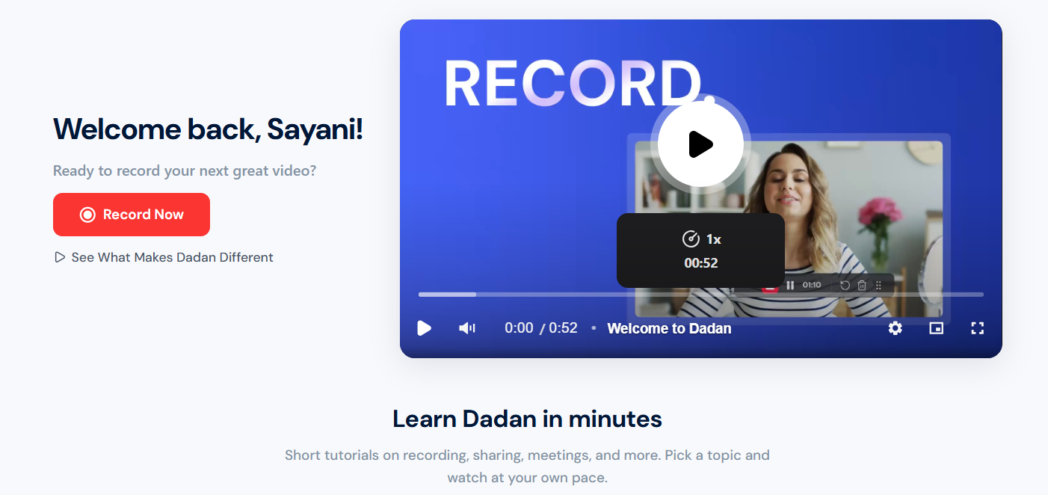
Dadan handles recordings up to 4K, so a polished demo keeps its quality. If you are starting from scratch, the screen recorder runs in the browser with no download required.
Step 2: Open the Video and Turn On In-Video Leads
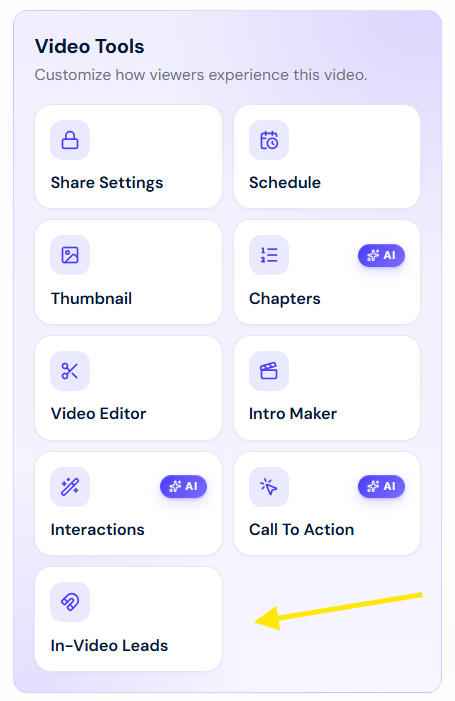
Open the video from your library, then find the In-Video Leads icon on the right-hand side and click it.
Toggle the Enabled switch to activate the feature. The form appears in the video preview with fields for first name, last name, and email.
Step 3: Choose Which Fields to Ask For
Decide what you actually need. The form starts with first name, last name, and email, and you can switch off Collect Name to ask for the email alone.
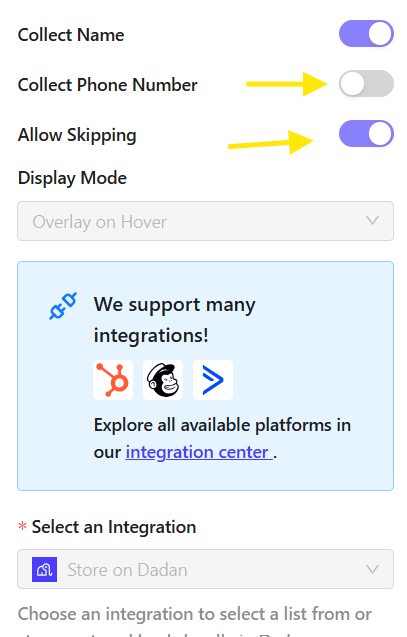
Turn on Collect Phone Number when a call is the next step, and use the Allow Skipping toggle to set whether viewers can pass the form or have to submit to keep watching.
Step 4: Write the Form Copy
Edit the Top Text so the ask matches what the viewer just watched, and set the Bottom Text as the confirmation message they see after they submit.
Copy that points back to the video does better than a generic sign-up line, so name the thing they get for handing over their details.
Step 5: Set When and How the Form Appears
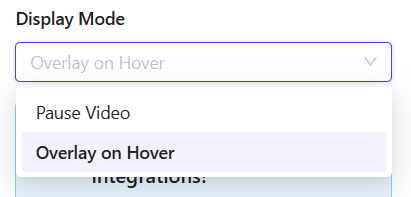
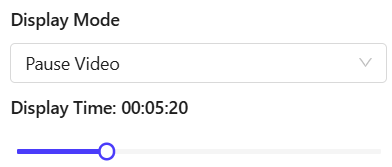
In Display Mode, choose Pause Video to stop playback until the form is filled, or Overlay on Hover to show it while the video keeps playing.
Then set Display Time to the exact point where the form should appear, such as right after a feature reveal or a result, not the cold open.
Step 6: Send Leads to Your CRM
Under Select an Integration, choose where the captured leads should land, then click Save.
Dadan connects with email and CRM tools including HubSpot, Mailchimp, and ActiveCampaign, along with other integrations, so each submission routes into your workflow.
For HubSpot, connect your account in Dadan’s Integrations settings, select HubSpot when configuring the in-video lead form, and save your settings. Submit a test lead after publishing the video to confirm that the lead appears in your connected HubSpot account.
Learn how to send video leads to HubSpot →
Step 7: Publish, Embed, and Track
Host the video on Dadan or embed it anywhere with a single embed code, such as a landing page, a blog post, or a campaign hub. The form travels with the video wherever it goes.
To pull your results, open the Viewer Engagements panel and click Download In-Video Leads to export every submission as an Excel file, or read them straight from the marketing tool you connected.
Best Practices for High-Converting Video Forms
The forms that convert ask for the least, appear the latest that still makes sense, and match the promise the viewer just watched. Most weak forms fail on one of those three, instead of the video itself.
Keep these habits in mind as you build.
- Ask for one or two fields, not five.
- Show the form after you have delivered value.
- Write the form copy so it points back to what they just saw.
- Use one clear action per form.
- Use the Allow Skipping toggle on purpose. Require the form when the content behind it is worth gating, and let viewers skip when you would rather keep the view than force the ask.
- Follow up fast. A lead captured mid-video is warm for hours, so route it to someone who can act while the interest is fresh.
Where to Place Video Forms for Maximum Conversions
Place the form right after the moment that earns it, and put the video wherever your highest-intent traffic already is. Placement works on two levels, the point inside the video and the place the video lives.
Inside the video, the sweet spot is the beat right after the payoff.
For a demo, that is just after the feature that makes people say they want this. For a tutorial, it is after the first genuinely useful takeaway.
Placing it earlier asks before the viewer is sold, and placing it at the very end misses everyone who dropped off along the way. Use the Display Time setting to land the form on that exact beat.
Across channels, the form is only as good as the traffic that reaches it. Embed the lead-capture video on the landing pages, blog posts, and campaign hubs where buyers already spend time, and drop it into email and social where you send warm audiences.
Because the form is embedded in the video rather than the page, it keeps working no matter where the video ends up.
Video Forms vs Traditional Landing Pages
A landing page makes people leave the video to convert, while a video form lets them convert inside it, which removes the step where most of them drop. Neither one replaces the other outright, so the honest answer depends on what you are asking for.
A landing page still earns its place when you need a long application form, a detailed offer, or a page that ranks and captures search traffic on its own.
A video form wins when a viewer is already watching and the last thing you want to do is send them somewhere else to convert. Many teams run both, using the video form to catch engaged viewers and the landing page for everything that needs more room.
Why Dadan Is Built for Interactive Video Lead Generation
Dadan keeps recording, editing, hosting, the lead form, and the analytics in one browser tab, so the video and the form that captures from it are never two separate tools.
Most recorders stop at the point you hit stop, which is exactly where lead generation should start.
Dadan built engagement into the video itself. Alongside lead forms, you get CTA buttons, a Calendly CTA for instant bookings, and a set of interaction types including polls, quizzes, and open questions, all placed on the same timeline. The AI Interactive Video Creator can even suggest a CTA based on what your video is about.
Because the whole workflow is in one place, a captured lead does not sit in a silo. It routes to your CRM through HubSpot, Mailchimp, or ActiveCampaign, and every view, click, and submission shows up in the same analytics view you use to judge the video.
For a marketer or sales team that wants views to turn into pipeline, that loop is the reason to reach for Dadan over a plain recorder.
Conclusion
Video forms turn a passive view into a captured lead by asking at the one moment a viewer is most likely to say yes, without sending them anywhere else to do it. Choose the videos where reaching the end actually means something, place the form right after the payoff, and keep the ask short.
Add your first lead form and see who your videos have been losing. Start free at dadan.io.
FAQs
What are video forms?
A video form is a lead-capture form that appears inside the video player at a point you choose, so viewers enter their details without leaving the video.
How do video forms generate leads?
They ask for a name, email, or phone number at the moment a viewer is most engaged, then send that information straight to you. Because the form is inside the video, you capture people who would have left before ever reaching a separate signup page.
Are video forms better than traditional forms?
For engaged viewers, yes, because a video form captures them inside the content instead of asking them to click away first. A traditional form still fits longer or more detailed asks, so many teams use both depending on the offer.
Where should I place a lead form in a video?
Place it right after the moment that earns the ask, such as after a feature demo, a result, or a clear takeaway. Asking too early loses people who are not yet convinced.
What information should I ask for in a video form?
Ask only for what you will actually use. Dadan starts with first name, last name, and email, and you can drop it to just an email or turn on a phone number field when a call is the next step, so keep it lean to hold completion rates up.
Can video forms improve conversion rates?
They can, because they remove the click to a separate page and ask while the viewer is still engaged, which is where most conversions are won or lost. The lift depends on your video and offer, so test the placement and field count and watch what happens in your analytics.
What is the best software for video lead generation?
Dadan is built for it, since it records, edits, hosts, and captures leads from one browser-based platform with in-video forms, CTAs, and CRM routing. That means the video and the form that captures from it stay in the same place instead of across two tools.
Can I connect video forms to my CRM?
Yes. Dadan connects with CRM and email tools including HubSpot, Mailchimp, and ActiveCampaign, so leads captured in your videos flow into your existing workflow automatically.
How do I track video form performance?
Open the Viewer Engagements panel in Dadan to see views, completion rate, and CTA clicks, then click Download In-Video Leads to export every submission as an Excel file. Leads also flow into any marketing tool you connect, so you have both the numbers and the contacts in one place.
Can I use video forms for customer onboarding and webinars?
Yes. Gate an onboarding walkthrough behind a short form to confirm who is going through it, or promote a webinar in a video and collect registrations directly, with no separate landing page needed.