













Skip links

HD Game Recorder

Record Gameplay Online with Audio, Zero Lag

Record your gameplay in high resolution, edit instantly using AI, and share with your audience without lag or watermarks.

Join 30,000 + users already using dadan
to communicate via async video

game Warzone
Recording Bar

How to Record Gameplay on Your PC - Quick Setups

Step 1

Sign Up & Download

Sign up on the dadan website. Download the Windows or Mac app. You can also install the Chrome or Edge browser extension.

dadan platforms
Step 2

Configure Your Setup

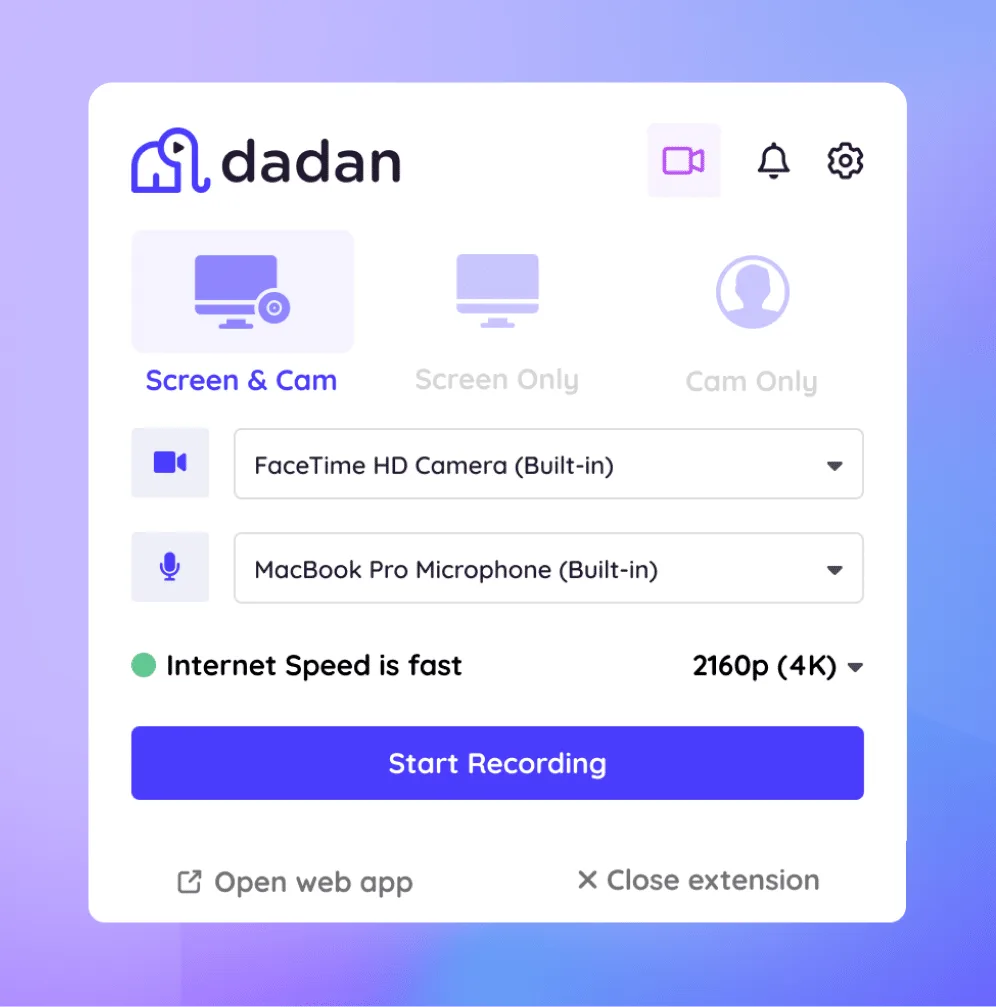
Select the recording mode: screen, webcam or screen+webcam. Choose video resolution and audio inputs. Press the Start Recording button.

record setup
Step 3

Start Capturing

Launch your game and enjoy your gameplay like you do. Dadan will take care of the rest. When finished, press Stop Recording; the video saves automatically.

dadan recording
Step 4

Edit and Share

Press Stop Recording when you're done. Edit your clip or add interactions like polls and quizzes, then share it instantly.

edit video toolbar
NEW
sparkles

Make your video interactive with AI

Generate interactions and enhancements with AI Assist (Dadan’s brand-new suite of powerful AI Video tools). Add quizzes, polls, questions and overlay text automatically as well as transcripts, chapters, video metadata and more!

ai homepage

Meet Our Happy Customers

IMGBG

Everything You Need for Pro-Level Gameplay Capture

video

HD Recording

Dadan records gameplay in up to 4K quality with 60fps support. That means you can record fast-paced games without issues.

like tag

No-Lag Performance

Every video frame is recorded with zero lag to provide an uninterrupted viewing experience.

sound

Audio Recording

Dadan records game audio, your voice, and system sound simultaneously without distortions.

webcam

Facecam Overlay

Include webcam overlay with gameplay and voice recording to create streaming content.

edit

Editing Tools

Use the built-in advanced video editor to trim, cut, merge, as well as zoom and blur video sections.

subtitle

Add Subtitles (AI Assist)

Get an AI-powered transcription in a few seconds. Upload them to your video to generate the captions.

share

Direct Sharing & Upload

Share videos with direct links. Or upload them to YouTube from dadan directly.

upload

Hosting & Sharing

Get free storage to save your gameplay videos to the cloud. Upgrade for more space.

cross platform

Cross-Platform Support

Windows, Mac, or Chromebook, download the app or install the extension without worrying about compatibility.

Dadan Game Screen Recorder vs Xbox Game Bar

Dadan Game RecorderXbox Game Bar
Cloud-based screen recorderBuilt-in Windows screen recorder
Supports up to 4K recording at 60 FPSDoes not record in 4K resolution
Supports recording of both screen and webcam simultaneouslyCannot record the screen and webcam at the same time
Includes a built-in editor with a mix of basic and advanced featuresNo in-app editor. Editing videos requires a separate, third-party editor
Instant cloud sharing with direct links and 10GB of free hosting space.Saves videos locally to your hard drive; limited sharing options.
Includes AI Assist features like video chapter generator and transcription creator.Provides basic functions like performance monitoring, screenshot capture, and chat integration.
Cross-platform: Windows, Mac, Chrome browser.Windows-only
Can record the entire screen, a particular window, or a part of the screen area.Only records one window at a time.

Create Your Free dadan Account To Start Using Desktop App or Chrome Extension

FAQs

A game recorder captures your screen while you play.  Gamers use advanced screen capture tools that can simultaneously record the screen, webcam, and audio. These recorders also support high-graphic gameplays without causing lag or tanking the FPS.

Dadan is a user-friendly freemium screen recording and video editing software. After signing up and downloading the app, you choose whether to capture your screen, webcam, or both. Select the video resolution and recording area, and press ‘Start Recording.’

The user interface is extremely user-friendly and requires no technical setup.


Yes,  if you use an advanced screen recorder, then you can record videos in excellent quality with minimal or no performance impact.

Yes, screen recorders like dadan support both system audio and microphone recording. This means you can effortlessly record the game audio and your voice simultaneously.

With an advanced screen recorder, you can record webcam while recording gameplay. This mode is useful when you’re making a reaction or a review video.

MP4 is the most popular format for saving gameplay recordings, as it offers a high-quality recording without a very large file size.

If you use an advanced screen recorder like dadan, you can record in 4K up to 60fps. High FPS ensures smooth footage for fast-paced action games, too.

Yes, dadan supports high-graphic gameplays like Warzone, Valorant or Fortnite.

No, Dadan currently does not have a streaming function.

Dadan is known for its excellent performance with minimal system impact.

Yes, Dadan offers a mix of basic and advanced editing features. The built-in video editor allows creators to trim, cut, merge, zoom, blur and export videos effortlessly.

Dadan does not add a watermark to videos, even in the free plan.
