If you have tried collecting video feedback before, the hard part was never the recording. It was getting people to actually do it without making them download an app or create an account.
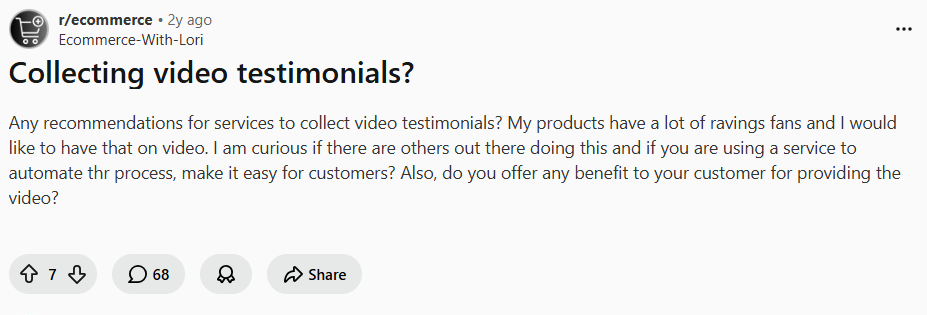
You are not the only one stuck with this problem. In a lot of Reddit communities, store owners regularly ask about how to collect video testimonials from customers, for example, this one.
The other half of the problem was cost, since most tools that do this well sit behind a paywall. Both of those have free fixes now, and the five tools below all let someone answer a request in a single click.
What Is Video Feedback?
Video feedback is feedback someone records as video instead of typing. That’s it. The reason it beats text is that it carries signal that text throws away:
- The tone tells you whether the client is happy
- A screen recording shows the exact click where your product works or doesn’t
- Facial expression tells you when a feature actually worked
Three jobs come up over and over:
- Customer testimonials
- Product feedback
- Internal feedback
Quick check on why it’s worth the effort. Same prompt, two answers.
It helps to see the difference in practice. Give two customers the same prompt. One leaves a survey comment that says good but a bit slow. The other records a 40-second clip where they say the dashboard felt slow and point at a report that took eight seconds to load.
Video Feedback vs Surveys vs Email Feedback
Surveys and email are not the enemy. They answer a different question, and most teams reach for text out of habit.
A survey gives you a number you can track across a thousand customers, but it will not tell you why the number moved.
Email is easy to send and easy to ignore, so replies tend to be either two words or a wall of text you skim once and forget.
But the video asks a little more of the respondent and does not roll up into a tidy chart, but it gives you depth and context a checkbox never will.
| Video feedback | Surveys | Email feedback | |
| Captures best | Tone, context, real reactions | Comparable scores at scale | Quick written notes |
| Respondent effort | Low | Low to medium | Low |
| Depth | High | Low to medium | Medium |
| Easy to quantify | No | Yes | Partly |
| Marketing proof | Strong | Weak | Rare |
| Best for | Testimonials, product feedback, team review | Trend tracking, CSAT | Lightweight follow-ups |
The best way is to stack them. Run a survey to find who is unhappy and who is delighted, then send those two groups a one-click video request to find out why.
5 Free Video Feedback Tools to Use
All five have a free plan. Match the tool to what you do with the video after you collect it.
1. Dadan: The Best Free All-Rounder
Most tools on this list do one slice of the job. Dadan does the whole loop. You record your own video, edit it in the browser, host it, and collect video back from other people, all in the same place.
If you would rather not bolt a testimonial tool onto a separate recorder, that is the real value.
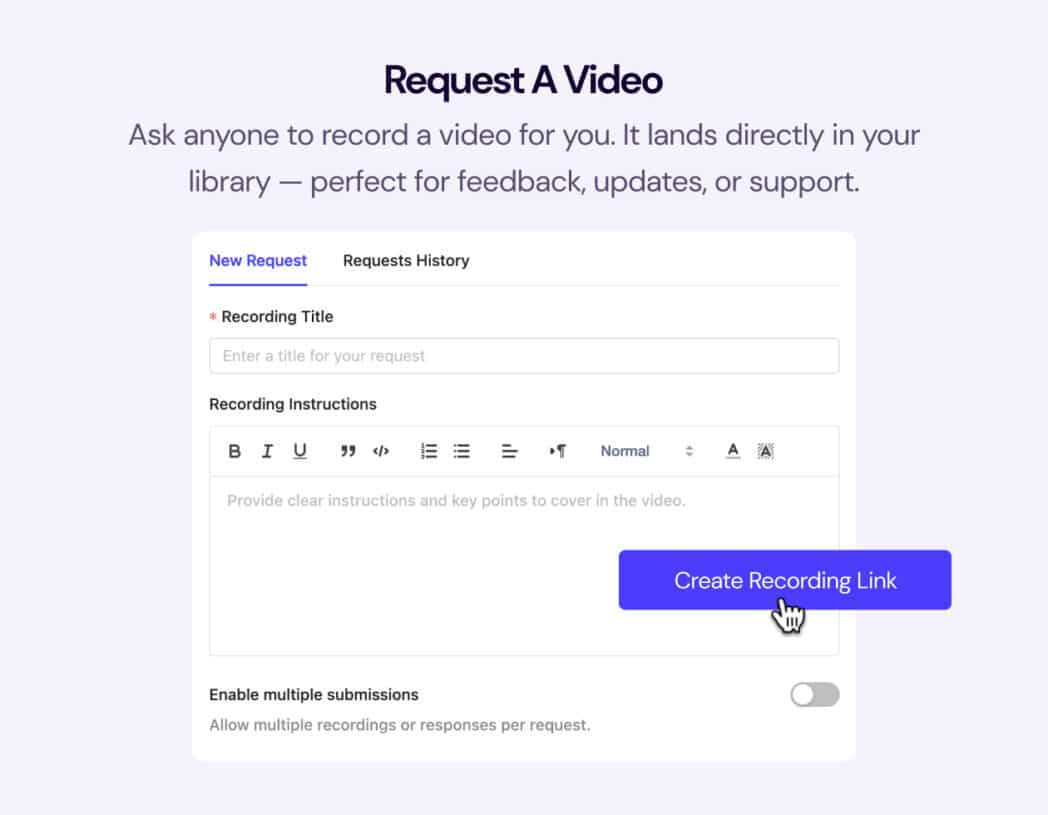
The feature that makes it a feedback tool is Request a Video. You share a link, and the recipient taps it and records a reply as video, audio, or text. There is no Dadan account to create and nothing to download, and you can switch on anonymous submissions so nobody has to sign up to respond.
Every reply lands in your library, transcribed by AI Assist, ready to search instead of rewatch. You can also add a lead-capture form, poll, or quiz on top of a video, so one request gathers feedback and qualifies the person leaving it at the same time.
For a real-world version. You ship a new flow, send a request link to 10 trial users, and ask them to record their screen while they try it. You have 10 clips by the next day showing exactly where they hesitate, with no calls, no scheduling, and nothing for them to install.
Best for teams that want recording, editing, hosting, and collection in one tool, async product feedback, and educators or trainers gathering responses.
Key features
- Request a Video link, with replies by video, audio, or text, an anonymous option, and no signup
- Record screen, webcam, or both, up to 4K on paid plans
- Browser editor plus transcript-based editing
- AI Assist for transcripts, summaries, titles, and chapters
- In-video forms, polls, quizzes, and CTAs
- 20+ integrations, including HubSpot, Slack, YouTube, and Google Classroom
Pricing:
- Free
- Professional: $8/user/mo
- Business: Custom
Responder experience:
✅ Excellent. One tap, no account, record from any device.
2. VideoAsk
VideoAsk, built by Typeform, treats feedback as a guided conversation instead of one recording.
You record a short question on camera, the respondent answers, and you branch to a follow-up based on what they said. That question-by-question flow pulls more thoughtful answers than a blank tell us what you think.
Responses come back as video, audio, or text, transcribed automatically so you can search them. You can embed it as a floating widget or share a link.
The catch is the pricing model, and it is worth doing the math first.
The free plan gives you 20 minutes of processing per month, counted every time you or a respondent records.
So, a campaign with 50 customers leaving 30-second answers comes to 25 minutes, which already puts you over the free tier in a single push. Paid plans bill on the minutes you consume, which users have repeatedly flagged as hard to budget as volume grows.
Best for conversational feedback and screening, marketers collecting testimonials with follow-ups, and an on-site feedback widget.
Key features
- Branching, multi-step video questions
- Video, audio, text, or multiple-choice answers
- Auto-transcription and a searchable inbox
- Embeddable widget
- Integrations with HubSpot, Calendly, Mailchimp, Zapier, and more
Pricing:
- Free
- Grow: $24/mo
- Brand: $40/mo
Responder experience:
✅ Excellent. One link and they can answer in video, audio, or text.
3. Vocal Video
Vocal Video is narrower on purpose. It is built for marketers who want finished, on-brand testimonial videos without sending raw clips to an editor.
When a customer responds, it adds your logo, captions, and brand colors automatically and produces a video ready for a landing page or a social ad. Respondents can also re-record an answer they are unhappy with before they submit, which keeps drop-off low.
But cost is the real problem here. The free tier caps you at 5 videos, and the paid plans are the most expensive on this list by some distance, starting near $99/mo and billed annually only.
Unless polished, auto-edited testimonials are your single biggest need, it is hard to justify the spend when the others do a similar collection for a fraction of the price. The editing is also convenient rather than deep.
Best for marketing teams producing polished testimonials quickly, and small businesses or nonprofits without an editor.
Key features
- Auto-branding with your logo, captions, and colors
- Built-in turnkey editing
- A re-record option for respondents
- Name and contact capture for attribution
- Embeddable galleries and Walls of Love
Pricing:
- Free
- Essential: $99/mo
- Pro: $149/mo
- Scale: $249/mo
- Enterprise: Custom
Responder experience:
✅ Good. No account with a re-record option if they fluff a take.
4. Senja
Senja flips the priority. Collecting is easy, but the real strength is what happens after you collect, which is turning feedback into social proof on your site.
You build a form, share one link, collect video and text, then drop responses into widgets, carousels, or a Wall of Love. It also imports reviews from more than 20 platforms, including Google, LinkedIn, and G2, so you can consolidate praise that already exists.
But remember, it is a display tool first. If you need screen recordings, internal review, or real video editing, it is the wrong fit.
Best for displaying customer feedback as on-site social proof, and pulling scattered reviews into one branded wall.
Key features
- Video and text in one form
- Imports from 20+ review platforms
- Widgets, carousels, and Walls of Love
- AI tagging and sentiment on higher tiers
- Embeds for Shopify, WordPress, Webflow, and Wix
Pricing:
- Starter: $29/mo
- Pro: $59/mo
Responder experience:
✅ Good. One link, no account, record or type.
5. Boast.io
Boast.io is video-first with moderation at the center. You build a review form, trigger email invites, and approve each testimonial before it publishes.
For a service business where reputation is the product, that approval gate is the reason to pick it over something lighter.
It is also broader than just video. Boast collects written testimonials and star ratings from the same form, so you can gather a mix of formats and use them in different spots on your site.
The request side is built for automation, with email and SMS sequences that chase customers for you and integrations that push approved praise straight to Google, Facebook, or other channels through Zapier. That makes it a sensible fit when testimonial collection is a steady, ongoing process rather than a one-off campaign.
The trade-off is with the video itself. Boast captures the raw clip and ties it to the review, but it gives you little room to trim, edit, or add your own branding, so the output reads as an authentic recording rather than a produced marketing piece. Also, the free response limits are restrictive, and the jump to paid is steeper than the rest of this list.
Best for businesses that need an approval step, service providers managing reputation, and structured review collection.
Key features
- Video review forms and email invites
- An approval and moderation workflow
- Desktop and mobile recording with no app
- Embeddable display widgets
Pricing:
- Basic: $50/mo
- Team: $100/mo
- Premium: $208/mo
Responder experience:
✅ Good. One link, no account, any device.
How Customers Can Submit Video Feedback
The biggest reason these campaigns die is the effort you put in front of people. If you make someone download an app, create an account, and fight with a camera, they close the tab.
A request link works because the person answering has almost nothing to do. Here is how the whole flow runs in Dadan, from your setup to their submission.
Step 1: Create a Dadan Account
You can work from the web app, add the Chrome or Edge extension, or install the Windows or Mac app.
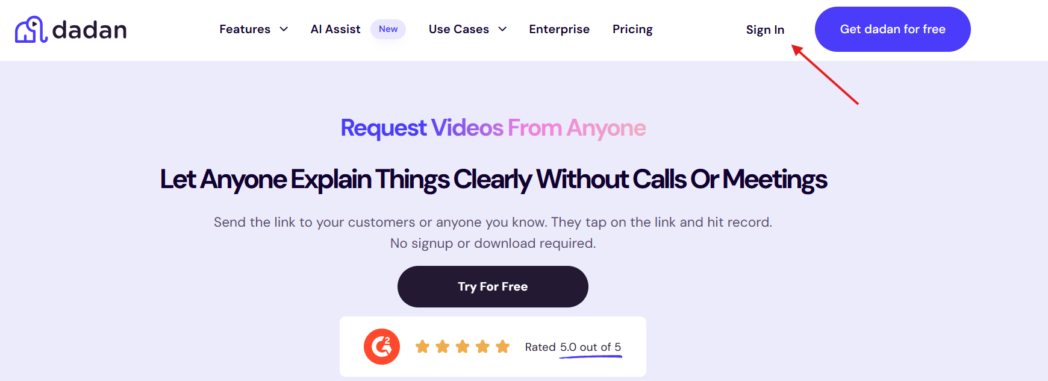
Step 2: Set-up the Request Form
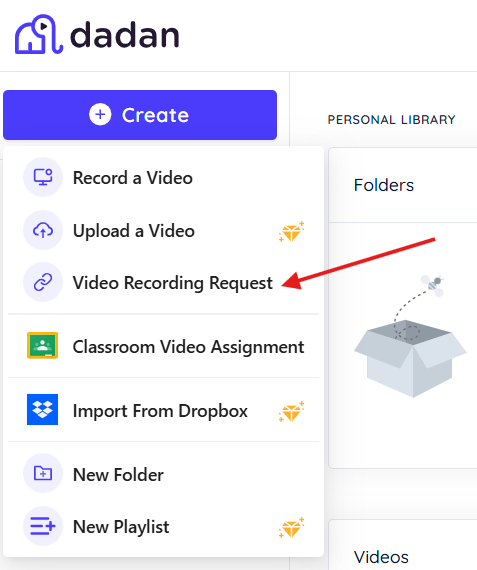
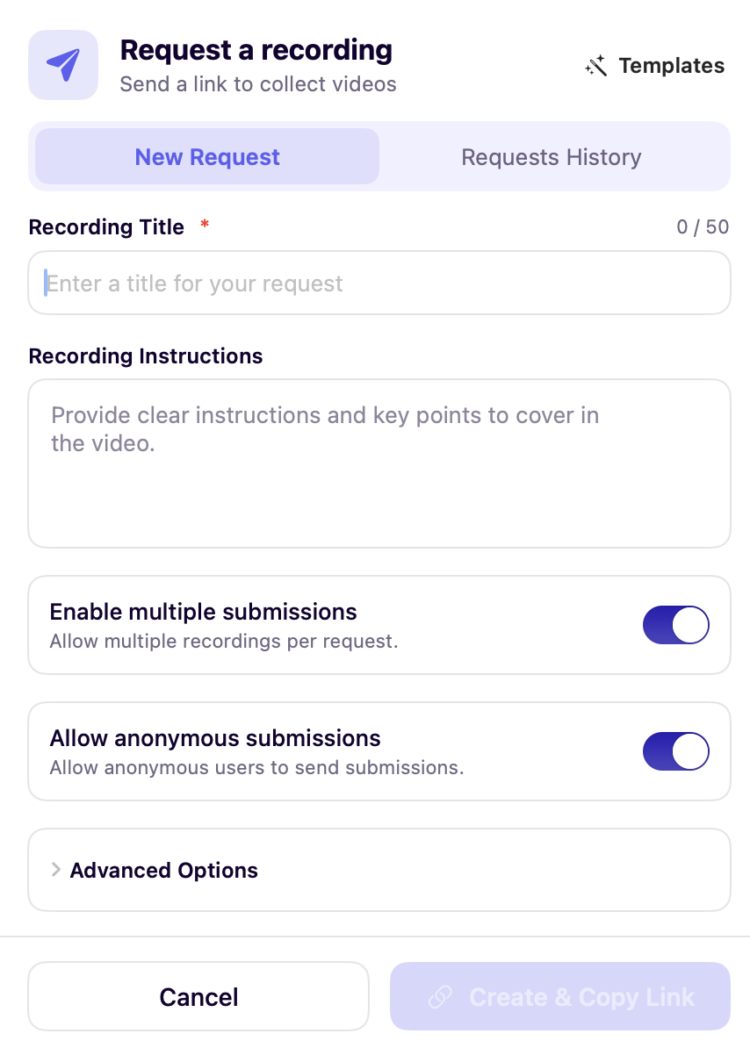
In the web app, click Create, then choose Video Recording Request. Add a title and short instructions so the person knows what to record.
You can also set a password, add a deadline, and choose whether the link accepts a single response or several.
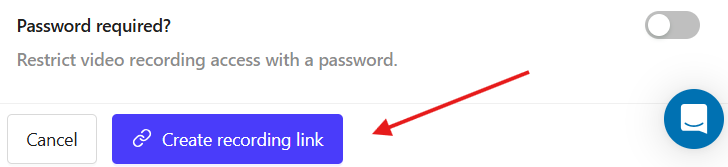
Step 3: Copy Link and Share It
Send it by email or any messaging app. There is nothing to attach and nothing for the recipient to install.
Step 4: Get Notified
When someone submits, the video lands in your dashboard and you get a notification, so you are not chasing anyone for it.
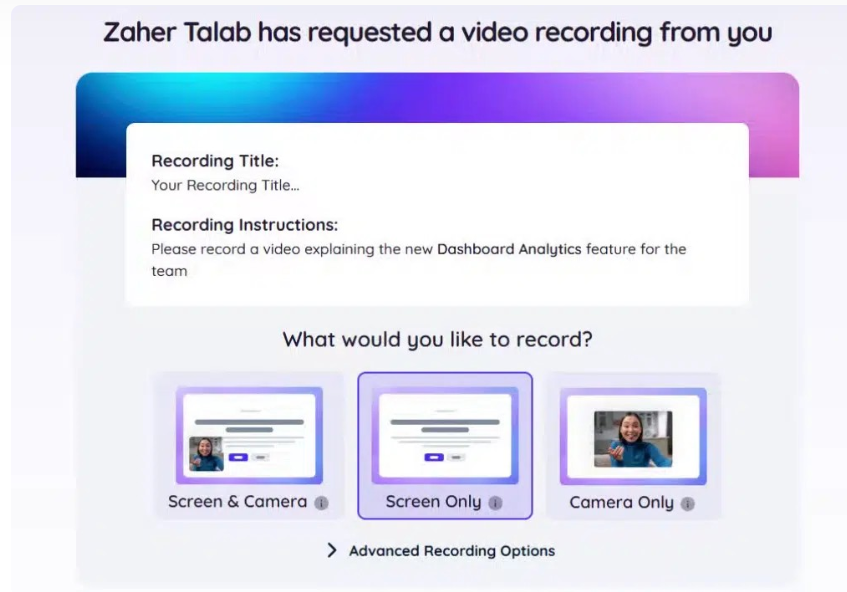
On the other end, what the customer has to do is:
- They click your link, which opens in the browser, with no account and no download.
- They read your prompt and hit record. They can capture their screen, their camera, or both.
- They review the take and submit.
- The video arrives in your library, transcribed by AI Assist so you can read or search it straight away.
The steps you remove are the steps where people quit. With Dadan, a recipient can answer a request anonymously, with no signup and no install, which takes out the two stages that lose the most people. You can see the responder flow in the Dadan knowledge base.
Best Practices for Collecting Video Feedback
- Ask one specific question.
- Tell them how long to talk.
- Give permission to be imperfect. Tell people not to script it, not to fix the background, and that one take is fine.
- Ask at the peak. Send the request the moment they feel the value.
- Reply to anyone who records for you. A quick thank-you makes the next yes far more likely.
- Tag as you collect. Auto-transcripts, which Dadan and several others generate, make the library searchable instead of something you have to rewatch end to end.
Conclusion
Video feedback gives you the context that text strips out, and free plans have removed the last excuse not to collect it. Choose by the job.
If you want a wall of testimonials, lean toward a display-first tool. If you want one place to record, edit, host, and collect, Dadan does the whole loop on a free plan, and your respondents can reply in a single click with no account.
Pick one tool, write one specific question, and send one link this week.
FAQs
Why is video feedback better than surveys?
A survey gives you a score, while video gives you the reason behind it through tone, expression, and context a checkbox cannot capture. Most teams use both, running a survey to find the right people and using video to learn why they feel that way.
How do customers submit video feedback?
You share a link, and they open it, see your question, and record from their phone or laptop. With Dadan they reply by video, audio, or text, with no account and nothing to install.
What are the benefits of video feedback?
You get authentic reactions, clearer context, and proof you can reuse in marketing, none of which text reliably delivers. It also cuts back-and-forth, since you see the problem or the praise firsthand.
Can video feedback improve team collaboration?
Yes, because a recorded walkthrough replaces a meeting and lets people respond on their own time. Dadan lets teams request and reply to videos directly, which tightens feedback loops without adding calls.
What is the best video feedback software?
It depends on the goal, since some tools are built for testimonials and others for a full video workflow. Dadan is the strongest all-rounder because it records, edits, hosts, and collects in one place on a free plan.
How do remote teams use video feedback?
They use it for async reviews, updates, and input across time zones without a call. A short request lets anyone respond when it suits them, so projects do not stall on availability.
How does AI help analyze video feedback?
It transcribes responses so you can search and skim them instead of rewatching, and it can summarize and tag them automatically. Dadan’s AI Assist generates transcripts, summaries, titles, and chapters, so a feedback library is actually navigable.
Is video feedback better than email feedback?
Video captures depth and emotion that email flattens into a few lines, so it is far more useful for understanding a customer. Email still works for quick notes, but it rarely produces anything strong enough to act on or publish.
How do you organize customer video feedback?
Tag each response by theme, product area, or use case as it arrives, and keep it all in one library. Dadan stores responses with folders, search, and a transcript on every clip, so the right one is easy to find later.