Meetings used to be a matter of clearing agenda items and calling it a day. Now they include global participants, hybrid time zones, and language switches within the same sentence.
You’ve probably nodded along on a call only to reread the transcript later and realize half the agreement was guesswork.
Multilingual transcription is about finally capturing the words you all intended to agree on, without having to replay the call three times.
What Is Multilingual Transcription for Meetings
Multilingual transcription is what makes a transcript usable when people switch languages mid-thought, when accents slow understanding, or when someone explains something once in English and again in their native language because it’s faster.
Instead of flattening everything into one imperfect version, multilingual transcription keeps track of what was said as it was said, language included.
That is important today because multilingual meetings aren’t structured differently. People still interrupt. They still clarify verbally. They still think out loud. The difference is that without proper transcription, a lot of meaning gets lost after the call ends.
Multilingual transcription exists to preserve that meaning and record it accurately enough that you can come back later and trust what you’re reading.
Why Multilingual Transcription Matters in Meetings
Multilingual meetings are part of everyday work if you collaborate across regions, markets, or customer bases.
People join calls with different levels of fluency, different accents, and different ways of explaining things. In many meetings, participants switch languages briefly to clarify a point or explain something faster. While the meeting is live, that usually works.
But the difficulty appears after the meeting ends.
Meetings Are Used as Reference Points
Meetings are rarely disposable conversations. They’re used to make decisions, assign tasks, and pass context to people who weren’t present.
When a meeting involves more than one language, relying on memory or short summaries makes that reference unreliable.
Language Differences Affect What Gets Carried Forward
In multilingual meetings, people don’t always walk away with the same understanding.
Some participants translate mentally. Others simplify their phrasing to keep the discussion moving. Clarifications may happen verbally in another language and feel clear at the time, but they don’t always survive recall.
Transcripts Reduce the Need to Reconstruct Meaning
Multilingual transcription creates a written record of what was actually said during the meeting.
Instead of reconstructing decisions from memory or secondhand notes, teams can refer back to the original wording used in the discussion. This makes it easier to confirm expectations, review decisions, and avoid follow-up meetings just to clarify earlier conversations.
Different Use Cases Depend on the Same Record
Remote teams use multilingual transcripts to share context across time zones. Sales and customer-facing teams use them to review requirements and commitments when conversations involve mixed languages.
Educators and content teams use them to preserve discussions, examples, and questions that don’t appear in slides or written material.
How Multilingual Transcription Works in Practice
Multilingual transcription works by capturing meeting audio and converting it into text while accounting for multiple languages, speakers, and accents. This usually happens automatically through AI-based transcription tools that process recordings during or after a meeting.
You don’t need to manage languages manually in most modern setups, but understanding what’s happening under the hood helps you know where things can go right and where south.
Audio Is the Foundation
Everything starts with the audio quality. The transcription system listens to the meeting audio and breaks it into segments based on speech patterns.
If the audio is clear, languages and speakers are easier to detect. If the audio is poor with overlapping voices, background noise, unstable connections, accuracy drops regardless of how advanced the tool is.
This is why desktop recordings, proper microphones, and stable connections matter more than people expect.
Languages Are Detected Automatically
If participants switch languages mid-meeting, the system identifies those changes and applies the appropriate speech models.
You don’t usually need to label speakers by language ahead of time, which makes this workable for meetings where language switching isn’t planned.
The transcript reflects those shifts instead of forcing everything into a single language.
Speakers Are Separated by Voice Patterns
In meetings with multiple participants, transcription tools distinguish speakers by analyzing voice characteristics and timing. The result is a transcript that separates dialogue by speaker, making it easier to follow discussions and attribute statements correctly.
Speaker detection isn’t perfect, but it’s far more reliable than a single block of text with no context.
Transcripts Are Generated and Time-Stamped
Once speech is converted to text, the transcript is structured with timestamps. This allows you to jump back to specific moments in the recording, search for keywords, or review exactly where a decision or clarification happened.
For meetings that run long or cover multiple topics, this becomes essential. Without timestamps, transcripts are harder to use as reference material.
But even with AI transcription, review is part of the workflow. Names, technical terms, and uncommon phrases may need correction, especially in multilingual settings. Most tools allow you to edit the transcript directly so the final version reflects the conversation accurately.
How to Use Multilingual Transcription in Dadan (Step by Step)
Using multilingual transcription in Dadan follows the same workflow as standard transcription, with language detection handled automatically in the background.
You don’t need to pre-select languages or configure anything differently for multilingual meetings. As long as the audio is captured clearly, Dadan’s AI Assist handles language detection and transcription during processing.
Step 1: Record or Upload Your Meeting
Start by getting the meeting audio into Dadan. You can do this in two ways:
- Upload an existing meeting recording from your device
- Record the meeting directly using Dadan’s screen recorder (desktop app or Chrome extension)
For live meetings, desktop recording is recommended so system or tab audio is captured clearly.
Step 2: Under AI Assist Select Transcription
Once your video or audio is uploaded, open the recording in Dadan. In the right-hand AI Assist panel, select Transcription. This triggers Dadan’s AI transcription engine, which begins processing the audio automatically.
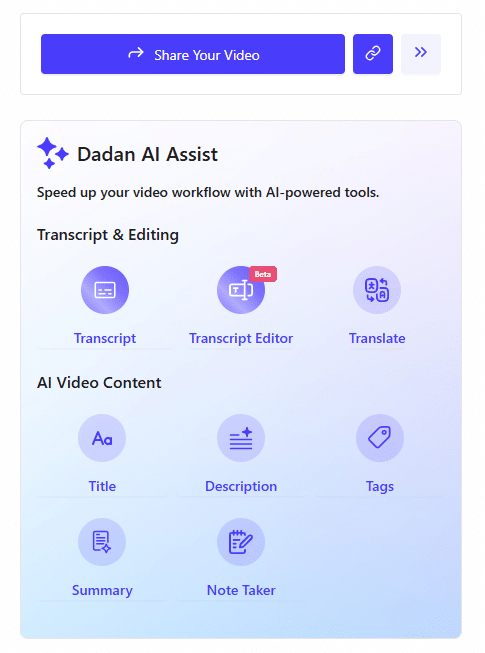
There’s no need to specify languages at this stage. The system detects spoken languages during processing.
Step 3: Let Dadan Process the Transcript
Dadan converts the meeting audio into text, identifying:
- Spoken languages
- Speaker turns
- Timing and structure
Dadan’s transcription can recognize audio in multiple languages and produce a transcript that includes those languages as spoken. You can then translate the transcript into other languages as needed.
Processing time depends on the length of the recording, but most meeting transcripts are generated within minutes.
Step 4: Review and Edit the Multilingual Transcript
After processing, the transcript appears alongside the video.
You can:
- Scroll through the text while the video plays
- Click on a line to jump to that moment in the recording
- Edit words, names, or technical terms if needed
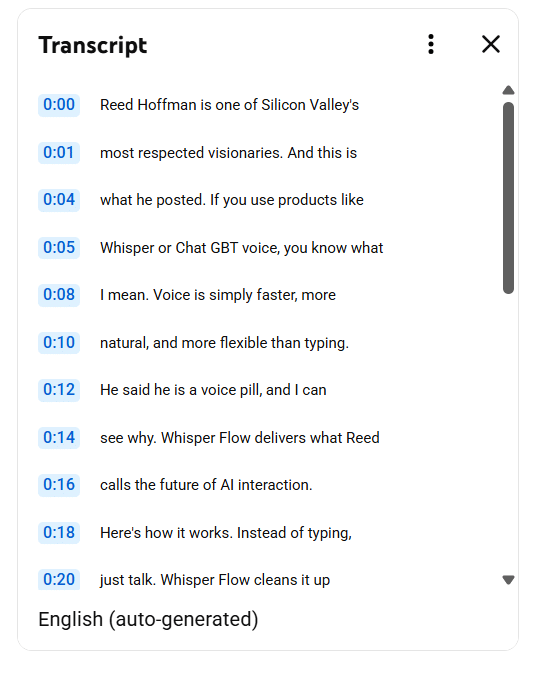
This step is important for multilingual meetings, where proper nouns, product names, or mixed-language phrasing may need light correction.
Step 5: Search, Export, or Reuse the Transcript
Once reviewed, the transcript becomes fully searchable inside Dadan.
You can:
- Search for keywords across the entire meeting
- Export the transcript for documentation or sharing
- Use it as input for summaries, meeting notes, or content repurposing
At this point, the transcript functions as a reliable written record of the meeting, regardless of how many languages were spoken during the call.
Step 6: Translate the Transcript Into Other Languages
After the transcript is generated and reviewed, you can translate the entire transcript into other supported languages.
In Dadan, translation is a separate step from transcription. The original transcript remains in the language(s) spoken during the meeting. If you need a translated version, you can generate that from the transcript.
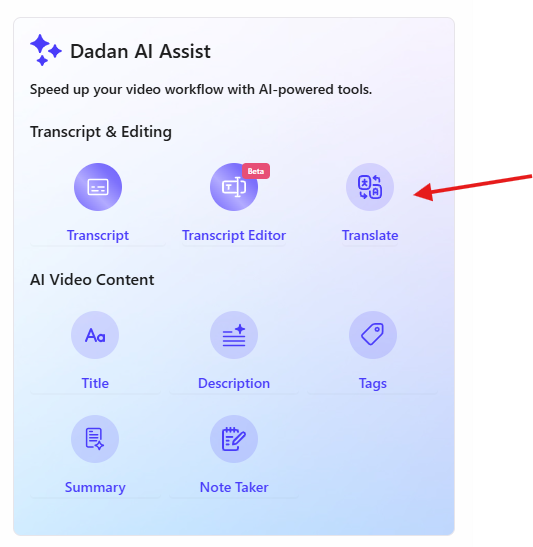
To do this:
- Open the transcript in Dadan
- Select the translation option from the AI Assist tools
- Choose the target language
- Generate the translated version
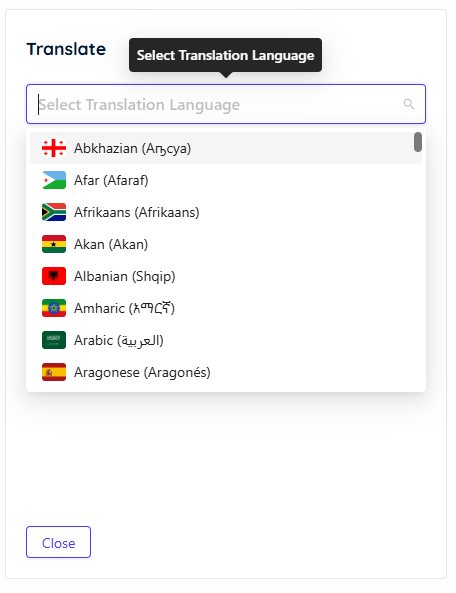
The translated text can then be used for captions, subtitles, or exported alongside the original transcript. This allows you to keep the original multilingual transcript intact while also providing a single-language version when needed.
Benefits of Using Multilingual Transcription
Once multilingual transcription is part of your workflow, meetings become something you can actually use afterward. The benefits show up in how easily you can revisit decisions, share context, and avoid repeating conversations that already happened.
Clearer Follow-Through After Meetings
When meetings involve multiple languages or varying fluency, small clarifications often happen verbally and disappear later. A transcript preserves those details so follow-up work is based on the same reference, not individual interpretation.
Easier Sharing With People Who Weren’t on the Call
Meeting outcomes are often shared with people who weren’t on the call. With a transcript, you can share the discussion itself instead of rewriting it into summaries or explanations. This is especially useful when decisions are discussed across languages and need to be understood consistently.
Improved Accessibility and Inclusion
Multilingual transcripts make meetings more accessible. They help participants who process information better through text, people with hearing difficulties, and team members who are more comfortable reading than listening.
When combined with translation, transcripts also make it easier for non-native speakers to review conversations at their own pace.
Easier Reuse of Meeting Content
For educators, trainers, and content teams, transcripts turn live conversations into reusable material.
You can extract notes, examples, and explanations directly from the transcript instead of reconstructing them from memory. This makes it easier to turn meetings, workshops, or interviews into documentation, learning material, or internal resources.
Less Reliance on Repeating Meetings
Instead of scheduling another call to clarify what was already discussed, you can point to the transcript. This saves time and reduces meeting overload, especially for teams that already rely heavily on live discussions.
Security and Privacy
Meeting audio often includes internal discussions, customer information, strategy, or personal data. Once that content is turned into text, it becomes easier to search and share, which also means it needs to be handled carefully.
Secure Storage
Before transcription even happens, the recording itself needs to be stored securely. In tools like Dadan, recordings are uploaded to your account and processed within the platform rather than passed around as local files.
Access is controlled by your login and workspace permissions, instead of public links or downloaded copies by default. This reduces the risk of recordings being shared unintentionally.
Limited to Authorized Users
Most teams rely on role-based access so only invited collaborators can view, edit, or export transcripts. This is important for meetings that involve clients, internal planning, or sensitive discussions that shouldn’t be broadly visible.
Before sharing transcripts externally, check who has access and what permissions they have.
No Public Exposure
Using AI transcription does not automatically make your content public. The audio and transcript remain within your account unless you explicitly share or export them.
This is different from public captioning tools or social platforms where recordings may be processed or surfaced more broadly. As long as you control sharing, transcription stays internal.
Less Risk
Raw transcripts often include more than what you intend to keep. Side conversations, offhand comments, or personal information can appear in the text.
Reviewing and editing the transcript before sharing or exporting helps remove anything that shouldn’t be documented long-term. This step is especially important for customer calls, interviews, or internal reviews.
So, transcription tools provide the capability, but compliance depends on your workflow.
If you work in regulated environments, you may need to:
- inform participants that meetings are being recorded
- limit transcript access
- define retention periods
- avoid exporting transcripts unnecessarily
Conclusion
When conversations include multiple languages or different levels of fluency, relying on memory or short notes isn’t enough. A transcript gives you a stable record you can refer back to instead of guessing what was meant.
Used consistently, multilingual transcription makes meetings easier to reuse, easier to share, and easier to act on, especially for remote teams, customer-facing roles, educators, and creators working across regions.
The key is to treat transcription as part of your meeting workflow. Capture the audio, review the transcript, translate when needed, and share it intentionally. That’s how meeting conversations continue to be useful once the call ends.
FAQs
How is multilingual transcription different from translation?
Multilingual transcription converts spoken audio into text in the same language it was spoken, even if multiple languages appear in the same meeting. Translation is a separate step that converts that text into another language. In most workflows, you transcribe first to preserve the original conversation, then translate only if you need a single-language version for sharing or accessibility.
Which meeting platforms support multilingual transcription?
Most meeting platforms focus on hosting and recording meetings, not transcription itself. Multilingual transcription is usually handled by external tools like Dadan that process recordings from platforms like Zoom, Google Meet, or Microsoft Teams, or from uploaded audio and video files.
Can multilingual transcription handle multiple speakers in one meeting?
Yes. Modern transcription tools separate speakers based on voice patterns and timing, producing transcripts that are broken into speaker turns.
How accurate is multilingual transcription for different accents?
Accuracy depends primarily on audio quality. Clear microphones, minimal background noise, and limited overlap between speakers produce better results.
Can I edit the meeting transcript after transcription?
Yes. Editing is a normal part of the workflow. Transcripts can be corrected for names, technical terms, and phrasing before they are shared, exported, or translated, ensuring the final version reflects the conversation accurately.
How can multilingual transcription help remote and global teams?
It provides a shared written record that teams can refer back to after meetings. This makes it easier to align across time zones, share context with people who weren’t present, and reduce follow-up meetings caused by unclear or inconsistent understanding.
Is multilingual transcription suitable for sales and client meetings?
Yes. Sales and customer-facing teams use multilingual transcription to capture requirements, constraints, and next steps accurately, especially when clients explain details in different ways or switch languages to be precise.
Does Dadan automatically detect languages during meetings?
Yes. When you generate a transcript in Dadan, supported languages are detected automatically during processing. The transcript preserves the languages as spoken, and translation is available as a separate, optional step.
Can ChatGPT transcribe meetings?
No. ChatGPT does not record or transcribe audio. It can work with transcripts generated by other tools, such as summarizing or rewriting them, but it does not capture meeting audio itself.
What is the best software to use for transcription?
The best option depends on your workflow. If you need recording, transcription, editing, translation, and reuse in one place, an all-in-one platform like Dadan is designed for that. For simpler needs, standalone transcription tools may be sufficient.
Recommended Readings:
- How to Record Skype Calls on Windows and Mac for Free
- How to Record GoToMeeting as Attendee Without Permission
- How to Record a Zoom Meeting as a Participant – 4 Easy Ways
- How To Record Google Meet Meetings Without Premium
- How to Write Minutes of Meeting Easily
- Best Way to Capture Meeting Notes in 2026: AI vs Manual